
Two names usually come up when businesses start looking for a signature app: PandaDoc and DocuSign. Both platforms let you send, sign, and manage documents online, but they handle document workflows in different ways.
DocuSign is well known as one of the pioneers of e signatures and is widely used by large organizations. PandaDoc, focuses more on helping teams create, send, and track documents quickly, especially in sales driven workflows.
So which one should you choose?
In this guide, we compare PandaDoc vs. DocuSign to help you understand the key differences and decide which tool fits your workflow best.
Contents
- PandaDoc vs. DocuSign at a glance
- What is the main difference between PandaDoc and DocuSign?
- PandaDoc vs. DocuSign: Features comparison
- PandaDoc vs. DocuSign: Pricing comparison
- PandaDoc vs. DocuSign: Ease of use and signing experience
- Security and compliance
- Best use cases
- PandaDoc vs. DocuSign: Pros and cons
- Which app should you choose?
- How to manage your e signature workflow across all your apps
- PandaDoc vs. DocuSign FAQs
PandaDoc vs. DocuSign at a glance
If you just want a quick overview before going deeper, this table highlights the main differences between PandaDoc and DocuSign.
| PandaDoc | DocuSign | |
| Main focus | Document creation and sales workflows | Secure electronic signatures and agreement management |
| Best for | Sales teams, SMBs, proposals and quotes | Enterprises, legal teams, regulated industries |
| Document creation | Built in drag and drop editor | Usually upload documents created elsewhere |
| Templates | Large template library and reusable content blocks | Basic templates for frequently used documents |
| Integrations | Strong CRM integrations like HubSpot, Salesforce, and Pipedrive | Large integration ecosystem with enterprise platforms |
| Security and compliance | SOC 2 Type II, GDPR, ESIGN and UETA compliant | SOC 1, SOC 2, ISO standards, FedRAMP, eIDAS and more |
| Ease of use | Modern interface designed for quick document creation | More structured workflow focused on signing and compliance |
| Typical users | Sales, marketing, agencies, growing teams | Legal, finance, HR, and enterprise organizations |
What is the main difference between PandaDoc and DocuSign?
The main difference between PandaDoc and DocuSign comes down to how each platform approaches document workflows.
- DocuSign focuses primarily on the signing process. Most teams create their documents in another tool such as Word or PDF editors, upload them to DocuSign, and then send them for signature. This makes it a strong choice for organizations that mainly need secure, compliant electronic signatures at scale.
- PandaDoc is designed to handle more of the document lifecycle inside the platform. Teams can create documents using a built in editor, use templates, add pricing tables, track engagement, and collect signatures without switching tools.
PandaDoc vs. DocuSign: Features comparison
Both PandaDoc and DocuSign cover the basics you expect from an e signature app, but they handle the document workflow a bit differently.
Let’s see how PandaDoc and DocuSign compare across the most important feature areas.
Document creation and editing
One of the biggest differences between PandaDoc and DocuSign is how documents are created.
- With PandaDoc, you can build documents directly inside the platform using a drag and drop editor. This makes it easy to create proposals, quotes, or contracts without switching to another tool.
- With DocuSign, most teams prepare their documents somewhere else, usually in Word or as a PDF, and then upload them to DocuSign to add signature fields and send them out.
Winner: PandaDoc
If your team needs to create documents, customize proposals, or build templates directly inside the app, PandaDoc offers a more flexible document creation experience.
E signature tools
When it comes to collecting signatures, both cover the essentials. You can send documents for signature, add signing fields, set the signing order, and track the status of each document.
- PandaDoc lets you add signature fields directly inside its document editor and send documents for signing in just a few clicks. You can also set reminders, track when a document is opened, and receive notifications once it’s signed.
- DocuSign focuses heavily on the signing process itself. It offers advanced routing options, strong authentication methods, and detailed audit trails, which is one reason it is widely used by large companies and regulated industries.
Winner: DocuSign
If your priority is a highly secure and robust signing process with advanced authentication and compliance features, DocuSign has a slight edge in this category.
Templates and reusable content
Templates are key for teams that send similar documents again and again. They help save time, keep documents consistent, and avoid rebuilding contracts or proposals from scratch.
- PandaDoc includes a large template library and lets you create reusable content blocks. This is especially useful for teams that send proposals, quotes, or contracts frequently and want to keep branding and structure consistent.
- DocuSign also supports templates for documents you send regularly. However, the focus is more on standard forms and agreements rather than building visually rich documents.
Winner: PandaDoc
If your team relies heavily on templates and reusable sections to create documents faster, PandaDoc offers more flexibility.
Approval workflows and automation
Many teams need documents to be reviewed or approved before they are sent for signature. This is where approval workflows and automation features can save a lot of back and forth.
- PandaDoc lets you set up approval steps so documents can be reviewed internally before they go out. You can also add notifications and reminders to keep things moving without manual follow ups.
- DocuSign also supports approval routing, especially in higher tier plans. Its workflow tools are often used in more structured environments where documents need to follow specific approval chains.
Winner: PandaDoc
If your team needs simple approval steps and automated reminders to keep documents moving, PandaDoc is usually easier to manage.
Integrations with CRM, storage, and business tools
Most teams do not use an e signature app on its own. It usually needs to connect with other tools like CRMs, cloud storage, or productivity apps.
- PandaDoc integrates well with sales focused tools such as HubSpot, Salesforce, and Pipedrive. This makes it easy to create and send documents using data that already lives in your CRM.
- DocuSign offers a much larger integration ecosystem overall. It connects with hundreds of platforms, including Microsoft tools, enterprise systems, and many third party apps.
Winner: PandaDoc
If integrations are a priority and your company relies on a large tech stack, DocuSign usually offers more options.
Reporting and document tracking
Knowing what happens after you send a document can help you follow up at the right time.
- PandaDoc gives you detailed tracking. You can see when a document is opened, how long someone spends reviewing it, and when it gets signed. This is especially helpful for sales teams that want to understand how prospects interact with proposals.
- DocuSign also provides document tracking and full audit logs. These records show every action taken on a document, which is important for compliance and legal documentation.
Winner: PandaDoc
If you want more insight into how recipients interact with your documents, PandaDoc offers stronger engagement tracking.
PandaDoc vs. DocuSign: Pricing comparison
Pricing is one of the first things teams look at when choosing an e signature app. Both PandaDoc and DocuSign offer multiple plans depending on how many users you have and how advanced your document workflows need to be.
Here is a quick overview of how their main annual plans compare.
| Plan | Price (annual billing) | Key features | |
| PandaDoc | Free | $0 per month | Up to 60 documents per year, unlimited seats, document editor, tracking, support |
| Starter | $19 per user per month | Unlimited document uploads and e signatures, document editor, tracking | |
| Business | $49 per user per month | CRM integrations, approval workflows, custom branding, deal rooms, bulk sending | |
| Enterprise | Custom pricing | Advanced automation, CPQ features, API access, SSO, team workspaces | |
| DocuSign | Personal | $10 per month | Send up to 5 envelopes per month, reusable templates |
| Standard | $25 per user per month | Collaboration features, up to 100 envelopes per user per year | |
| Professional | $60 per user per month | Unlimited envelopes, bulk sending, payment collection, advanced agreement tools | |
| Enhanced plans | Custom pricing | Enterprise management, SSO, advanced compliance, customizable envelope limits |
What extra costs should you watch for
Most of the time, the price you see depends on the plan you choose. But some features can increase the final cost.
PandaDoc includes many core features in its plans, but some tools are marked as optional add-ons. These can include things like content locking, web forms, bulk sending, workflow automation, API access, Salesforce integration, SSO, or advanced support. If you need those features, they may come with an extra cost depending on your plan.
PandaDoc vs. DocuSign: Ease of use and signing experience
A good e signature tool should be easy for both sides of the process: the person sending the document and the person signing it. If the workflow is confusing or takes too many steps, it quickly slows things down.
Here is how PandaDoc and DocuSign compare when it comes to usability.
- Easier for senders: PandaDoc is usually easier if your team creates documents from scratch. You can build, edit, and send documents in the same place, which saves time.
- Better for signers: Both platforms offer a guided signing experience where recipients can clearly see where they need to sign or add information. DocuSign has built its reputation on making the signing process very smooth and reliable, which many users already recognize.
- Mobile and cross device experience: Both PandaDoc and DocuSign allow documents to be signed from desktop, tablet, or mobile devices. They also offer dedicated mobile apps, so users can review and sign documents from almost anywhere.
Security and compliance
When you’re dealing with contracts or important documents, security matters.
The good news is that both PandaDoc and DocuSign are built to keep documents safe and follow the main e-signature regulations used around the world.
- PandaDoc includes things like encryption, audit trails, and two factor authentication. It also follows common standards such as SOC 2, GDPR, ESIGN, and eIDAS.
- DocuSign is especially well known for its security and compliance features. It supports a wider range of certifications, which is one reason many large companies and regulated industries rely on it.
In everyday use, both tools are secure enough for most businesses. The main difference is that DocuSign has a longer track record with large organizations and stricter compliance environments.
Best use cases
Now that we’ve compared features, pricing, usability, and security, the next step is simple: which tool actually fits your workflow better?
Here’s a quick way to look at it based on common use cases.
| Best for | Best option | Why |
| Sales teams | PandaDoc | Built for creating proposals, quotes, and client-facing documents quickly with templates and a built-in editor. |
| Enterprise teams | DocuSign | Strong compliance standards and a large integration ecosystem make it a common choice for large organizations. |
| Simple e signature needs | DocuSign | Works very well if you only need to upload a document and collect signatures securely. |
| Document-heavy workflows | PandaDoc | Designed to create, edit, send, and track documents in the same platform, which helps teams manage high document volume. |
PandaDoc vs. DocuSign: Pros and cons
We’re almost at the end of the comparison. By now you probably already have a favorite, but let’s make the decision easier with a quick look at the main pros and cons of each tool.
| Pros | Cons | |
| PandaDoc | Built in document editor for creating proposals, quotes, and contracts | Fewer integrations than DocuSign |
| Strong template system and reusable content blocks | Some advanced features are available only as add ons | |
| Good engagement tracking for documents | Compliance certifications are not as extensive as DocuSign’s | |
| Often easier for teams that create documents frequently | ||
| Built in pricing tables and proposal tools | ||
| DocuSign | One of the most trusted e signature platforms worldwide | Document creation usually happens outside the platform |
| Very strong compliance and security standards | Envelope limits exist in some plans | |
| Large integration ecosystem | Fewer built in tools for creating rich documents | |
| Smooth and reliable signing experience | Built in pricing tables and proposal tools |
Which app should you choose?
By now you’ve seen how PandaDoc and DocuSign compare in features, pricing, usability, and security. The right choice really depends on how your team works and what you expect from your e signature tool.
- Choose PandaDoc if you want to create proposals, quotes, or contracts directly inside the platform. It works especially well for sales teams or businesses that send client facing documents regularly.
- Choose DocuSign if your main goal is to collect signatures securely and reliably. It is often the better fit for large organizations or teams that already prepare their documents in other tools.
- Both tools work well if you simply need a trusted way to send documents for signature and keep track of the signing process.
How to manage your e signature workflow across all your apps
It does not really matter if you use PandaDoc or DocuSign. In real life, signing documents is only one part of your workday.
This is where Rambox fits naturally.
Rambox lets you keep all those apps together in a single interface. Your e signature app sits next to your email, project manager, CRM, and whatever else you use daily, so you stop losing time opening tabs and changing windows.
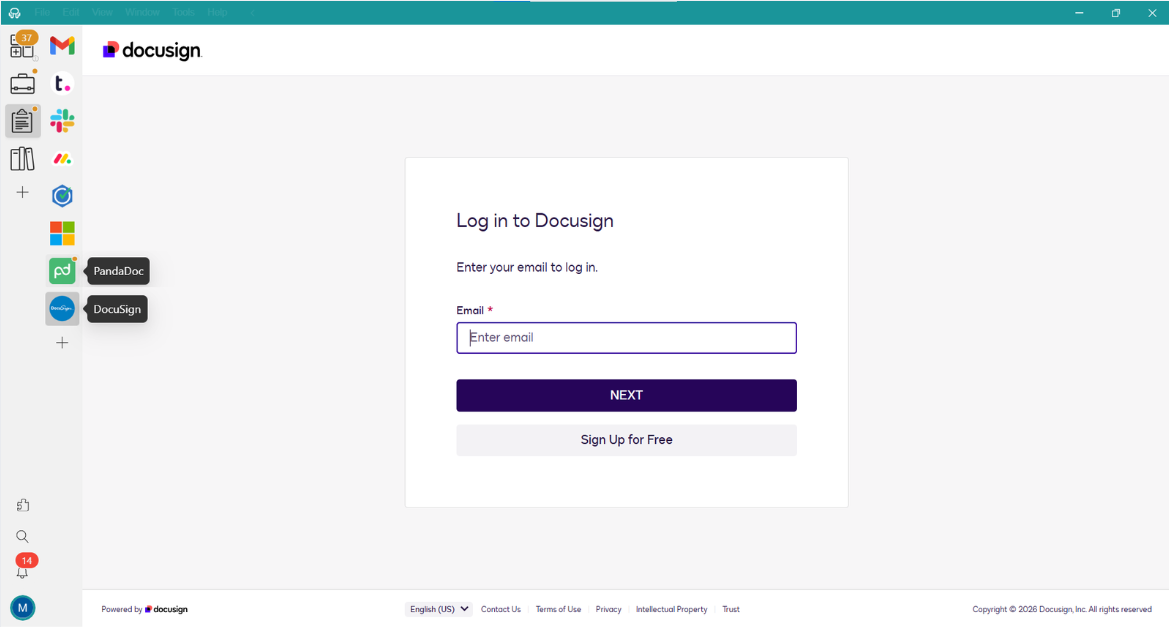

You can even:
- Organize your apps by project or client.
- Get notifications and updates in real time, without losing focus.
Adding PandaDoc or DocuSign to your workspaces or your apps bar in Rambox is very easy. Just follow the steps below:
- Go to the workspace where you want to add a PandaDoc or DocuSign Click on “+ Add an app or workspace.”
- Type “PandaDoc” or “DocuSign” in the search panel on the left.
- Configure the application settings to your liking. Remember that you can choose a profile for the app (inherit from workspace, primary, private, incognito, or custom).
- Click “Add,” and you’re done! Your app is now part of your Rambox workspace. It’s that simple!
Want to see how to add apps in Rambox in action? This short step-by-step video shows you how to set it up in minutes:
Sounds good, right? Try Rambox for free! Just sign up, download the app and you can start enjoying all its features. No cards, no cheating, it’s that simple!
PandaDoc vs. DocuSign FAQs
Is PandaDoc cheaper than DocuSign
In many cases, yes. PandaDoc plans often include unlimited documents and e signatures starting from lower price tiers. DocuSign can be affordable for basic needs, but some plans include limits on the number of envelopes you can send, which can increase the cost as usage grows.
Does DocuSign have better security than PandaDoc?
Both platforms offer strong security features such as encryption, audit trails, and compliance with major e signature regulations. DocuSign is often considered stronger in this area because it supports a wider range of compliance certifications and is widely used by large enterprises and regulated industries.
Is PandaDoc better for proposals and quotes?
Yes, PandaDoc is generally better for creating proposals and quotes. It includes a built in document editor, pricing tables, templates, and tools designed for sales teams that need to create and customize documents frequently.
Which app is better for small teams?
PandaDoc is often easier for small teams, especially those that need to create documents quickly using templates and a built in editor. DocuSign can also work well for small teams that mainly need a simple and reliable way to collect signatures.
Can you use PandaDoc or DocuSign inside a multi app workspace?
Yes. Tools like Rambox allow you to run apps such as PandaDoc or DocuSign alongside your email, CRM, project manager, and other daily tools in the same workspace, helping you keep everything in one place.