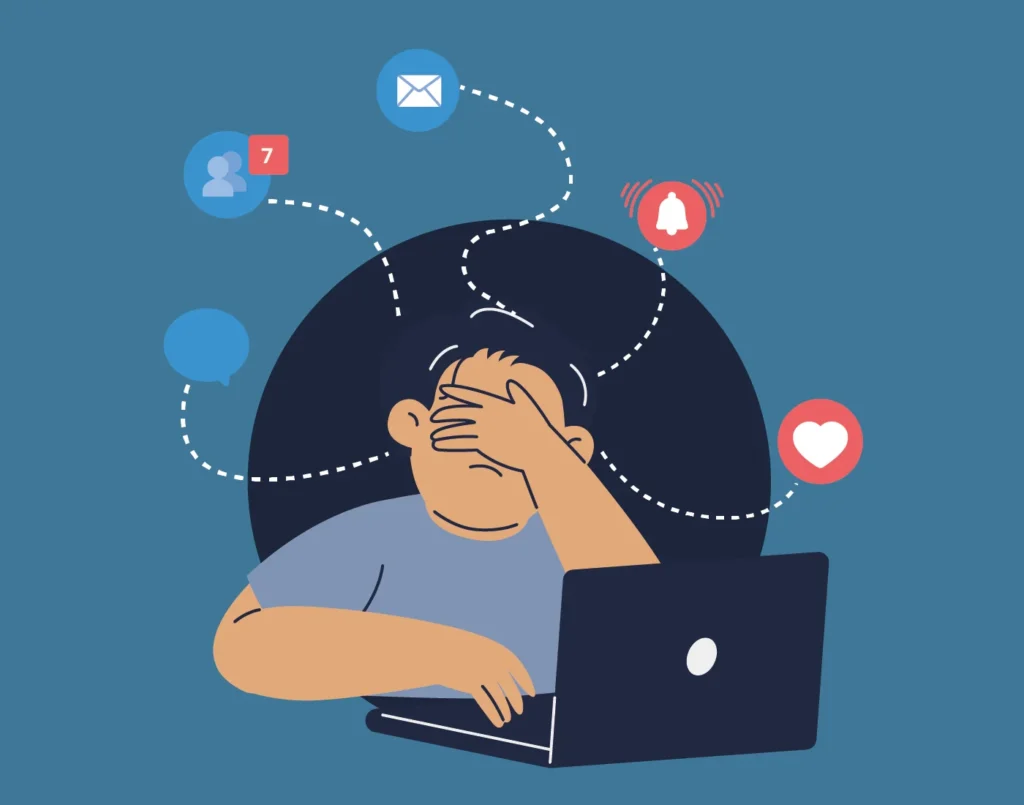
You’re writing a report when a Slack message pops up. Then an email arrives. A meeting reminder appears. A few minutes later you’re checking three different apps and you’ve forgotten about the report. Sound familiar? That constant jumping between apps and tasks is called context switching, and it quietly destroys productivity during the workday.
In this guide, you’ll learn what context switching is, why it happens so often at work, and 10 practical ways to reduce it so you can stay focused for longer.
Contents
- What is context switching?
- Why do we switch context so often at work?
- The hidden costs of context switching
- 10 practical ways to reduce context switching at work
- 1. Keep your tools in one place to reduce app switching
- 2. Organize your apps so you can find things faster
- 3. Use keyboard shortcuts to switch between apps faster
- 4. Control notifications across work apps
- 5. Protect deep work sessions with focus mode
- 6 Batch communication instead of reacting instantly
- 7 Use time blocking to protect deep work
- 8 Limit work in progress (WIP)
- 9 Group similar tasks together
- 10 Identify what makes you switch context during the day
- Practical example: What a low context-switching workday looks like
- FAQs about context switching
What is context switching?
Context switching happens when you move your attention from one task to another before finishing the first one.
At work, it often looks like this: you start writing a document, then check a message, open an email, review a file, and return to the document a few minutes later.
Each time you switch tasks, your brain has to pause, remember where you were, and get back into the task again.
One switch might not seem like a big deal. But when it happens many times during the day, it becomes harder to stay focused and keep your work moving forward.
Why do we switch context so often at work?
Context switching isn’t something most people plan to do. It usually happens because the modern workday is full of interruptions.
During a typical workday, your attention is constantly pulled in different directions:
| During the workday… | What usually happens |
| Messages arrive in chat apps | You stop to check them |
| Emails appear in your inbox | You switch tasks to read or reply |
| Meeting reminders pop up | Your attention moves to another activity |
| Tasks require different tools or documents | You jump between apps and conversations |
On top of that, many workplaces expect quick replies. When a message appears, the natural reaction is to check it right away, even if you’re in the middle of something else.
Over time, these small interruptions make it hard to stay focused on one task. Instead of working in a steady flow, your day ends up split between short bursts of attention across different tasks and apps.
Context switching may feel harmless. After all, checking a message or opening another app only takes a few seconds.
But research shows the real cost is much higher.
- The average worker uses around 9 to 11 different apps during a typical workday. — Asana Anatomy of Work Index
- Workers move between apps up to 25 times per day on average. — Asana Anatomy of Work Index
- Employees can switch between tabs, apps, or platforms more than 30 times a day, with some workers doing it over 100 times. — Lokalise productivity report
- After an interruption, workers need an average of about 23 minutes to return to the original task. — University of California.
- Only about 2.5% of people can handle two complex tasks simultaneously without a drop in performance. — Watson & Strayer multitasking study.
- Task switching increases mental workload and slows down performance. — Research on interrupted work.
How much productivity does context switching actually cost?
When you look at all these factors together, the impact becomes much easier to see. Modern work involves many apps, constant messages, and frequent interruptions.
Each switch may seem small. But throughout the day, those small switches break your focus again and again. Tasks take longer, concentration drops, and it becomes harder to stay in a productive flow.
Over time, these interruptions add up and start to drain a surprising amount of productivity.
Every time you switch from one task to another, your brain needs a moment to refocus. When this happens again and again during the day, work slows down and it becomes harder to stay focused. In fact, constantly switching between tasks can reduce productive time by as much as 40%. – American Psychological Association
10 practical ways to reduce context switching at work
Now that you’ve seen how negative context switching can be for your productivity, it’s time to do something about it.
Here, we’ll show you 10 practical ways to reduce context switching at work.
1. Keep your tools in one place to reduce app switching
One of the main reasons context switching happens is simple: your work tools are scattered everywhere.
A few minutes into your day you might be jumping between multiple browser tabs and desktop apps just to keep up with messages, emails, documents, and meetings.
Every time you move between these environments, you spend a few seconds figuring out where the tool is and what you were doing before.
Keeping your tools in one place helps reduce that friction. That’s where Rambox helps.
Instead of searching through tabs or switching between different apps, you can keep the tools you use most in a single workspace.
Rambox brings messaging apps, email, calendars, and other work tools into one place, so you spend less time looking for them and more time actually working.
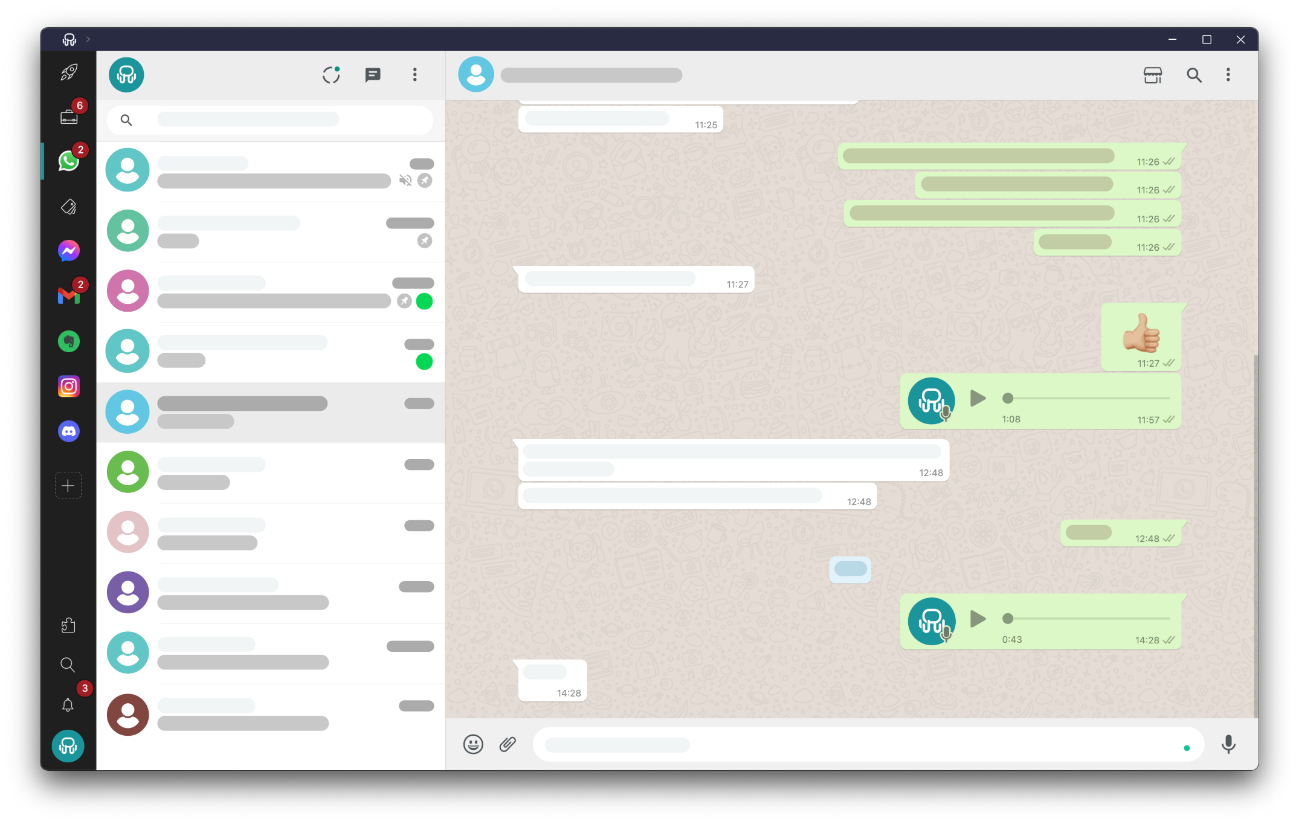
Keep All Your Apps in a Single Interface
Try Rambox for Free!
2. Organize your apps so you can find things faster
Now that all your apps are in one place, the next step is organizing them.
In Rambox, you can create different workspaces, which work like folders for your apps. For example, you might have one workspace for work and another for personal apps. This way, you always know where to find the app you’re looking for.
Want to see how Workspaces in Rambox work? In this video, you’ll see how to create your workspaces and add apps to them in just a few seconds:
You can also rearrange your apps using drag and drop, so you can place them in the order that works best for you.
With everything organized, it’s easier to find the tool you need and move between tasks without wasting time looking for the right app.
3. Use keyboard shortcuts to switch between apps faster
Even when your apps are organized, switching between them with the mouse can still slow you down.
Using keyboard shortcuts helps you move between tools much faster and keeps your hands on the keyboard.
In Rambox, you can switch between apps almost instantly with shortcuts like:
- Ctrl + Tab to move between apps or tabs
- Ctrl + 1–9 to jump directly to a specific app
- Alt + Backspace to return to the last app you used
Shortcuts are also useful in other tools you use every day. For example:
In your browser
- Ctrl + Tab to move between tabs
- Ctrl + 1–8 to jump to a specific tab
- Ctrl + W to close the current tab
On your computer
- Alt + Tab (Windows) or Cmd + Tab (Mac) to switch between open apps
These shortcuts won’t eliminate context switching. But they reduce the time it takes to move between tools, which can save a surprising amount of time during the workday.
4. Control notifications across work apps
Notifications are one of the biggest triggers of context switching.
A message appears in Slack. An email notification pops up. A LinkedIn alert shows up on your screen. Even if you don’t open them immediately, they still pull your attention away from what you were doing.
In Rambox, you can customize notifications for each app or even for entire workspaces. You can choose between:
- Desktop notifications
- Sound alerts
- Or turning notifications off completely
This gives you much more control over when you want to be interrupted.
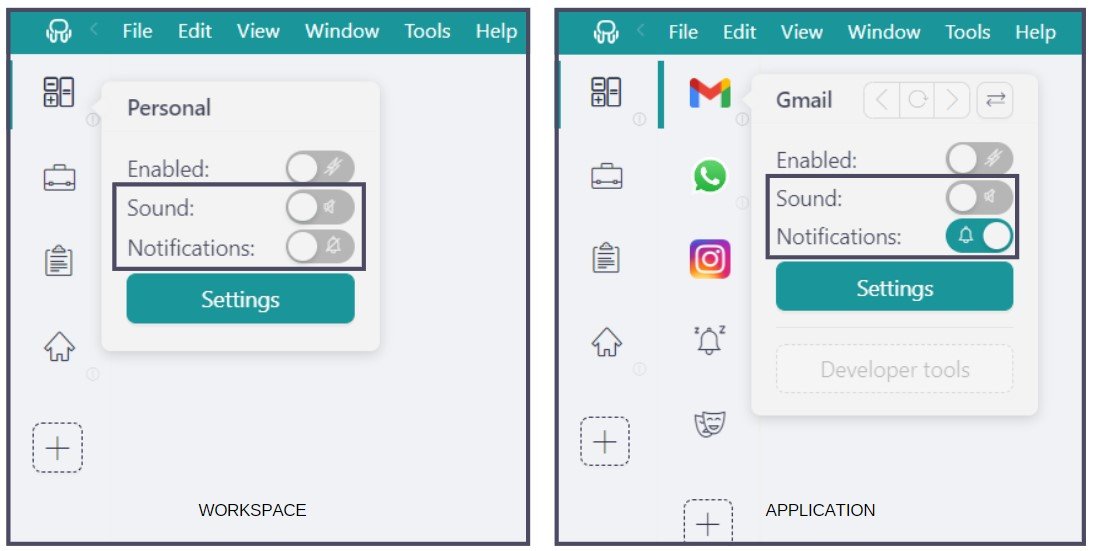
Choose How (Or If) You Want To Be Notified
Try Rambox for Free!
Want even more control? Rambox also lets you configure Work Hours for each workspace. This means notifications will only appear during the timeframes you choose.
And even when notifications are turned off, Rambox still shows unread counters on each app, so you can check messages when it makes sense for you.
Want to see how Rambox helps you customize notifications? Don’t miss this short video:
5. Protect deep work sessions with focus mode
Sometimes you just need to focus. Maybe you’re writing a report, preparing a presentation, or working on something that requires your full attention.
That’s exactly what Focus Mode in Rambox is for.
With a single click, Rambox silences all notifications and sounds across every app. No pop ups, no pings, no interruptions. Just a quiet workspace so you can concentrate on what you’re doing.
You’ll find the Focus Mode button next to your profile picture in the Notification Center. Once you activate it, Rambox mutes everything until you turn it off.
If you want, you can also start a Focus Session timer, which automatically turns Focus Mode off after a set period. This is perfect for blocking time for deep work without forgetting to re enable notifications later.
Want to see Focus Mode in action? Don’t miss this short video:
6 Batch communication instead of reacting instantly
Instead of responding to every message immediately, try batching your communication.
This means setting specific moments during the day to check and reply to messages or emails, instead of reacting to each notification as it appears.
For example, you might review messages once every hour, or dedicate specific blocks of time to communication.
💡 This approach helps you protect longer periods of focused work while still staying responsive to your team.
7 Use time blocking to protect deep work
If your calendar is full of meetings and small tasks, it becomes very difficult to focus on work that requires real concentration.
That’s where time blocking can help.
Time blocking means reserving specific blocks of time in your calendar for a single task. Instead of switching between different activities, you dedicate that time to one thing only.
For example, you might block two hours in the morning for deep work such as writing, coding, or working on an important project.
💡 By scheduling these focus blocks in advance, you protect time for meaningful work and reduce the constant task switching that happens during a typical workday.
8 Limit work in progress (WIP)
One of the fastest ways to create context switching is trying to work on too many things at once.
You start a task, switch to another one, then open a third before finishing the first two. By the end of the day, several tasks are half done and your attention has been jumping between all of them.
A simple rule can help: limit your work in progress (WIP). Instead of juggling many tasks, decide how many you’ll actively work on at the same time. For example:
- 1 main task
- 1 secondary task
Anything else waits until one of those is finished.
💡 This keeps your attention on fewer things and makes it much easier to finish work instead of constantly switching between tasks.
9 Group similar tasks together
Many small tasks during the day require the same type of thinking. Emails, scheduling meetings, reviewing documents, or updating tools.
If you mix them throughout the day, your brain keeps jumping between different types of work. For example:
| Without grouping tasks | With grouped tasks |
| Write a report → reply to an email → return to the report → schedule a meeting → open the report again | Write the report → finish the report → then reply to emails → then schedule meetings |
By doing similar tasks together, you avoid constantly changing mental context and your workday feels much smoother.
💡 This simple change can make tasks easier to finish and reduce the constant back and forth between different types of work.
10 Identify what makes you switch context during the day
If you want to reduce context switching, the first step is simple: notice when it happens.
For one day, pay attention to the moments when you suddenly switch tasks. Ask yourself:
- What made me switch?
- Was it a notification?
- Did I open another app out of habit?
- Was I stuck on the task I was doing?
At the end of the day, you’ll probably notice a few patterns.
💡 Once you know what usually triggers your context switching, it becomes much easier to change those habits and protect your focus.
Practical example: What a low context-switching workday looks like
Now let’s see how all these ideas can work together in a typical workday.
| Time | What you do |
| 9:00–9:10 | Open Rambox and customize notifications for the day. For example, keep alerts for email but mute other apps or entire workspaces. |
| 9:10–9:30 | First communication block: review messages and emails. |
| 9:30–9:45 | Organize your tasks for the day and set priorities. You can use a task manager like Todoist, Microsoft To Do, or Trello. |
| 9:45–11:45 | First deep work block and activate Focus Mode in Rambox while working on your main task. |
| 12:00–12:30 | Second communication block: review messages and emails again. |
| 12:30–14:00 | Continue with your main tasks, limiting your work in progress to one or two tasks. |
| 14:00- 16:00 | Second deep work block and activate Focus Mode in Rambox while working on your main task. |
| 16:00–16:30 | Third communication block: review messages and emails again. |
| 16:30–17:00 | Quickly review your day and notice when context switching happened the most. |
A workday like this doesn’t eliminate context switching completely. In modern work that’s almost impossible.
But by organizing your tools, controlling notifications, and protecting time for focused work, you can reduce how often it happens and keep your attention where it matters most.
If you want an easier way to bring all your work apps together, manage notifications, and protect your focus, try Rambox for free! Just sign up, download the app, and start organizing your workspace in minutes.
FAQs about context switching
Context switching vs Multitasking: What’s the difference?
These two ideas are often confused, but they’re not the same.
- Multitasking means trying to do two things at the same time. For example, replying to messages while listening to a meeting.
- Context switching happens when you stop one task to start another, then return to the first one later. For example, writing a report, then checking Slack, then opening your email, and finally going back to the report.
Most of the time, we’re not really multitasking. We’re just switching between tasks very quickly, which is what creates the productivity loss we talked about earlier.
Does context switching increase burnout or mental fatigue?
It can. Every time you switch tasks, your brain needs a moment to remember where you left off.
When this happens again and again during the day, it makes work feel more tiring than it should.
Do meetings increase context switching during the workday?
Very often, yes. Meetings usually interrupt whatever you were doing. You stop your task, switch your attention to the meeting topic, and later try to return to your work.
If meetings are scattered throughout the day, it becomes much harder to stay focused on tasks that require deep concentration.
Are there any tools to reduce context switching at work?
Yes. Some tools can help reduce the friction that causes context switching during the day.
Task managers like Todoist, Trello, or Microsoft To Do help you keep track of what you need to do.
Workspace simplifiers like Rambox can make a big difference. Instead of jumping between browser tabs, desktop apps, and different platforms, you keep your main tools in one place.