
Managing several clients is not only a matter of having more accounts. It also means rebuilding a different working setup every time you move from one client to another.
One client may use Gmail and Slack, another Outlook and Teams, while CMS, analytics, project and social tools also vary. Add internal agency tools used across accounts and each client becomes a different working setup. Rebuilding that setup, including finding tabs, opening apps and checking active accounts, adds friction every time you switch.
That friction also creates room for mistakes: analysing the wrong GA4 property, replying from the wrong inbox, posting from the wrong social account or updating the wrong project. Clear separation between client environments is therefore both a productivity and error-prevention issue.
Why client work gets harder to organize as an agency grows
Agency work is usually spread across a mixture of tools. Some are specific to the client, some are chosen by the agency, and many are general-purpose services used in different ways for each account.
Gmail may be a client-specific login, while Teamwork, Asana or Notion may stay on an internal agency account and still belong in the setup for Client A. The client does not need to use or even know about every tool in that working context.
The practical problem is that every client ends up with a slightly different working environment:
- Different communication channels.
- Different email or login identities.
- Different social accounts.
- Different analytics, CMS, ad or CRM access.
- Different project or collaboration tools.
- Shared agency tools that still need to be opened in the right client context.
- Different notification patterns and priorities.
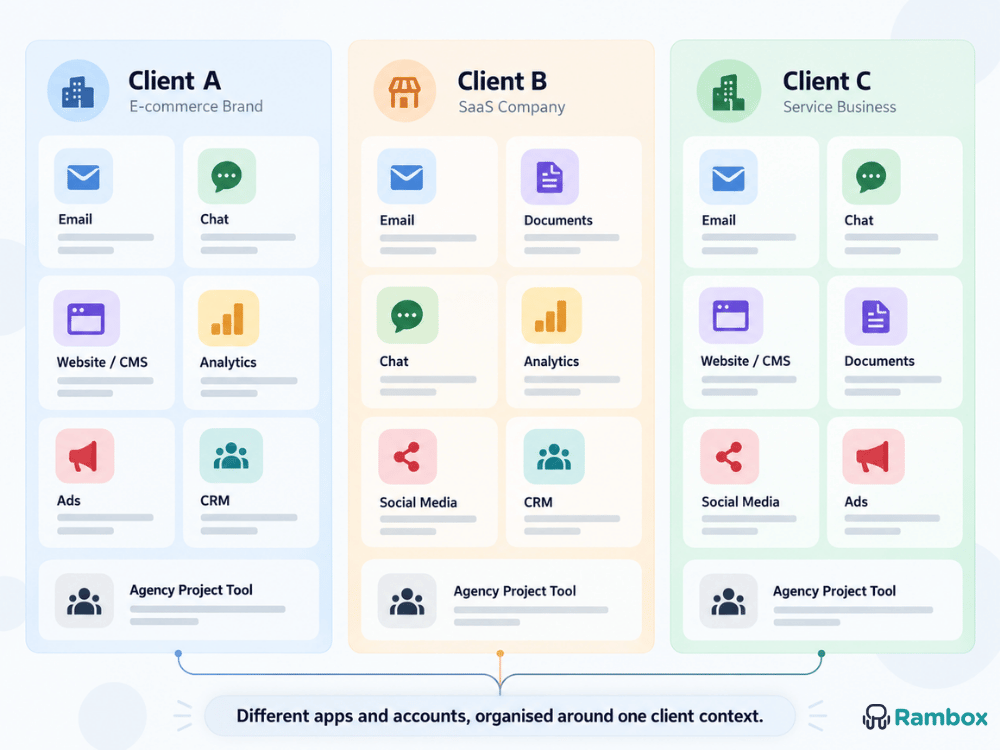
That combination is what we mean by a client context: the set of apps, sessions and tools you need when you sit down to work for a particular client.
Every client can have a different mix of tools
A realistic agency setup might look like this:
Client A
- Gmail
- Slack
- WordPress
- Google Analytics
- Meta tools
- Teamwork (internal agency account)
Client B
- Outlook
- Microsoft Teams
- HubSpot
- Webflow
- Teamwork (internal agency account)
Client C
- Gmail
- Slack
- Google Ads
- Notion
- TikTok
- Teamwork (internal agency account)
The important point is not that the same apps repeat every time. Some will, some will not. What matters is that each client has a specific combination that you want ready when you start working.
A setup like this is easier to think about as “Client A”, “Client B” and “Client C” than as a collection of disconnected browser tabs and account logins.
How agencies usually keep client work organized today
Agencies already use browser profiles, bookmarks, pinned tabs and account switching. Each can help, but each solves only part of the wider client-context problem.
Logging in and out works for occasional access, but scales poorly
Logging out and back in is simple for occasional switches and requires no extra setup.
It becomes slow when repeated across email, social, analytics, CMS and project tools, and makes it easier to lose track of the active client identity.
Browser profiles separate sessions, but not the whole setup
Browser profiles keep cookies, logins and browsing data separate, making it easier to maintain different client identities.
They can also preserve tabs and groups. The limitation is structural: as clients multiply, you may still move between several browser windows and profiles while client and agency tools remain spread across them.
Even with only two or three clients, that repeated setup can become distracting if you switch between them several times a day. For a broader comparison of the available methods, see How to manage multiple accounts on one computer.
Bookmarks, pinned tabs and tab groups speed up access, but remain manual
Bookmarks and tab groups speed up access, but they do not guarantee that the right session or client account is active.
The setup can also remain fragmented across tab groups, browser profiles and agency tools that still have to be opened separately.
Built-in account switching solves one app at a time
Built-in account switching is convenient when the problem is limited to one app.
Agency work usually spans several apps: choosing the right Gmail account does not also select the right Slack workspace, GA4 property, CMS or project board.
It solves one service, not the full client setup.
Specialized agency tools solve specific workflows, not the whole desktop
Specialized social media, CRM, project management or reporting tools can be the right solution for those specific workflows.
They do not necessarily organize the rest of a client’s apps, accounts and sessions, so the wider client context can still remain fragmented across several tools and environments.
A separate digital workspace keeps the full client setup ready
A broader approach is to create a persistent digital workspace for each client. Instead of rebuilding Client A, you return to its grouped apps and sessions. Switching to Client B means moving to another prepared context rather than reopening tabs and checking logins.
The value comes from less setup and a clearer active client context.
The workspace can mix client-specific tools with shared agency tools: Client A may use its own Gmail, Slack, GA4 and WordPress sessions while Teamwork or Asana stays on the agency account.
Organize your agency around client contexts, not individual apps
For many agencies, organizing by client is more natural than organizing by application because that is how the work is actually assigned.
If you are working on Client A, you may need to review an email, check analytics, update the website and then add a task for your own team. Those actions may happen in four different services, but they all belong to the same piece of work.
A client-based workspace keeps those tools together and makes the transition between clients more deliberate. Instead of asking yourself which browser profile, tab group or account you need next, you move into the client context and continue from there.
This does not mean every app in the workspace needs a unique client login. Some will use a client-specific session, while others may use a shared agency session. The important thing is that the workspace contains the combination you need to work effectively for that client.
How agencies can build client workspaces with Rambox
Rambox is a workspace manager for people and teams who work with multiple apps, accounts and work contexts. For an agency, that means creating dedicated workspaces for different clients, with the apps, accounts and sessions needed for each one ready in the same working context. Workspaces define the client context, while Profiles control the session environment used by the apps inside it.
Keep every client context ready to work
Group the apps and accounts you use for each client in a dedicated Rambox workspace, so you can switch context without rebuilding your setup.
Create a Workspace for the client and assign its Profile
Create a Workspace for the client with a clear name, icon or visual identity.
Assign a Profile to the Workspace. A Profile defines a separate session environment, and apps that inherit it use that client session context without interfering with apps on another Profile.
The Workspace therefore acts as a persistent client environment, not just a folder.
For example:
- Client A Workspace → Client A Profile
- Client B Workspace → Client B Profile
- Client C Workspace → Client C Profile
You can read more about how Rambox Profiles work in the Rambox Profiles documentation. For a feature-by-feature overview, see The best Rambox features for managing multiple clients.
Add the apps that belong to that client context
Then add the apps you actually use for that client. That may include email, communication, analytics, CMS, project management, social media, CRM or any other web tool. Rambox includes hundreds of preconfigured apps, and other web tools can be added as Custom Apps.
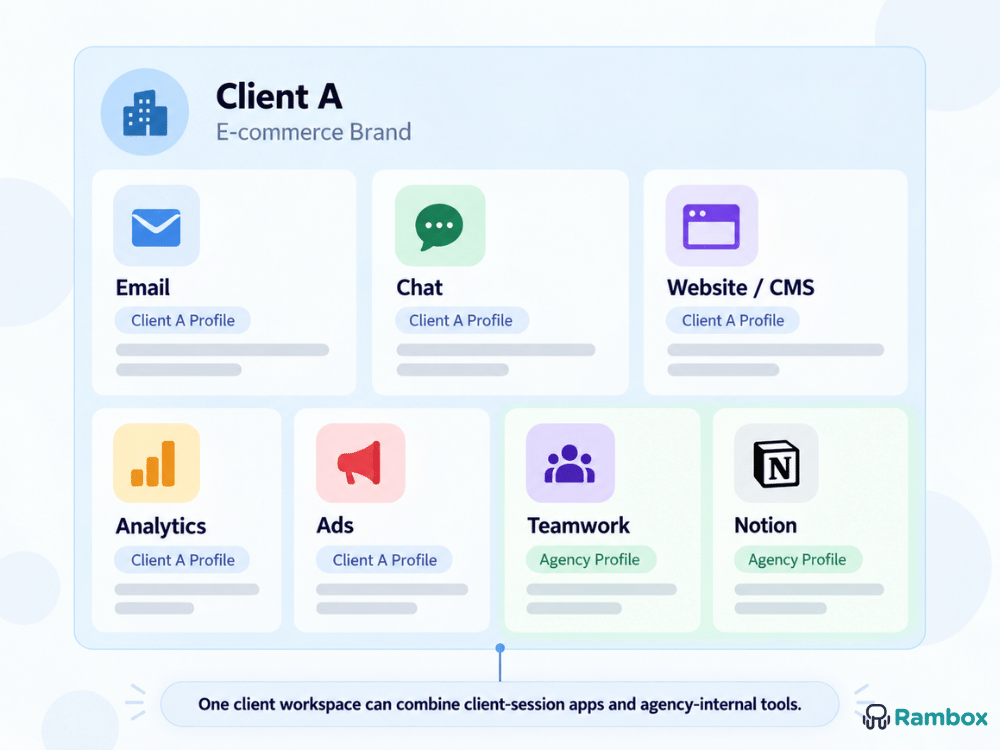
Most client-specific apps can inherit the Workspace Profile and its session context. An internal tool such as Teamwork, Asana or Notion can instead use the same agency Profile across several client Workspaces.
For example:
Client A Workspace
- Gmail (Client A Profile)
- Slack (Client A Profile)
- Google Analytics (Client A Profile)
- WordPress (Client A Profile)
- Teamwork (Agency Internal Profile)
Not every tool therefore needs a client-specific login.
Keep the setup persistent instead of rebuilding it every time
The setup remains persistent. Once Client A is configured, you reopen the Workspace with its tools and context already organized instead of reconstructing the setup.
Frequent client switching becomes a context change rather than a setup task.
Use notifications without letting every client interrupt you
Keeping several client Workspaces open does not mean all of them must interrupt you. Notifications and badges can be controlled by app or Workspace, reducing noise from clients you are not working on.
If you need a period of uninterrupted work, Rambox Focus Mode can temporarily silence notifications and sounds while you concentrate on one task or client.
Example: a marketing agency managing five clients
Consider an agency with five clients. One uses Gmail, Slack, WordPress and GA4; another Outlook, Teams, HubSpot and Webflow; others add Google Ads, TikTok, LinkedIn or different project tools. Internal tools such as Teamwork and Notion may span several clients.
One Workspace might use the client Profile for Gmail, Slack, WordPress and GA4 while Teamwork and Notion use the agency Profile. Another client can have a completely different mix.
The Workspace represents the complete working context, not just the client’s own tools or a collection of accounts.
It also makes the intended destination clearer. A GA4 app in Client A can open that client’s property by default. You can still navigate to another property if the same Google account has access, but the Workspace, app label and default destination reinforce the correct context.
Rambox does not replace your agency tools
Rambox is not meant to replace the tools an agency already uses for project management, social media, CRM, reporting or communication. Those tools still do the work they were designed for. What Rambox adds is a way to organize access to all of them around each client, so the stack your agency already relies on becomes easier to navigate and easier to switch between.
This distinction matters because agencies rarely control the entire client stack. One client may work in Gmail, Slack, WordPress and GA4, while another relies on Outlook, Teams, HubSpot and Webflow. Specialist tools can continue to handle their specific workflows, while Rambox provides a consistent way to group the apps, accounts and sessions needed for each client context.
That also makes adoption lightweight. Your agency does not need to migrate clients to a new platform or replace the tools they already use. You keep the existing stack and organize it in a way that reduces setup work, makes the active client clearer and lowers the risk of working in the wrong account. The value depends less on the number of apps than on how often moving between clients creates friction or uncertainty.
A cleaner way to move from one client to another
A client-based setup is most useful when it makes the current context obvious before you start working. Instead of reopening apps, checking accounts and reconstructing the desktop, you move into a prepared environment where the tools and sessions for that client are already in place. That makes switching more deliberate and reduces the mental work involved in remembering where each client lives.
Rambox Workspaces and Profiles support that model by keeping each client’s combination of apps, sessions and selected agency tools ready together. The goal is not to reduce the number of tools or force every client onto the same stack. It is to make the existing stack easier to enter and leave as your day moves from one client to another.
Switch clients without rebuilding your setup
Create a Rambox workspace for each client, keep the right sessions and agency tools together, and move between contexts with less friction.
Frequently asked questions
How can an agency manage multiple client accounts without constantly logging in and out?
Keep each client as a separate working context. Browser profiles, persistent sessions and client-based workspaces can all help; the key is to keep that client’s apps and sessions ready together instead of switching one account at a time.
What is the best way for a marketing agency to organize apps and accounts for multiple clients?
Organize around the client, not the individual app. Put the email, communication, analytics, CMS, social, project and internal agency tools needed for Client A together, then create a separate context for Client B.
How can an agency keep different clients’ accounts and apps separate on the same computer?
Use separate sessions for client-specific accounts and group each client’s tools in a clearly named environment. Browser profiles can separate sessions; a dedicated workspace can also keep the full app mix together.
Should an agency use a separate browser profile for every client?
Browser profiles can work well for a few identities. If each client also needs a different mix of apps and persistent setup, client-based workspaces can be easier to navigate than several separate browser profiles.
How can agencies reduce context switching between clients?
Keep each client environment persistent and ready to reopen, and reduce notifications from clients you are not working on. The switch then becomes a context change instead of a setup task.
How do I avoid mixing up accounts when working with several clients?
Use clear workspace names, separate sessions and a consistent structure. The goal is to make the active client obvious before you open analytics, email or social tools.
Is there a tool that lets an agency create a separate workspace for each client?
Yes. Rambox lets you create a dedicated workspace for each client, combine the apps you need, keep client-specific sessions separate and include shared agency tools where appropriate.
How can a marketing agency manage different app stacks for different clients?
Treat each client as its own working context. A client-based workspace can hold a completely different combination of apps, accounts and sessions without forcing every client into the same software stack.