
Feeling overwhelmed at work is no longer about having too much to do. It is about having too many places where work happens at the same time. Apps, tabs, messages, notifications, calendars, files. Everything competes for your attention, all day long.
Most advice about staying organized at work was written for a different way of working. One inbox, one desk, one task list. That reality no longer exists for many of us. Today, work is fragmented across tools, accounts, and constant interruptions, making organization feel harder than it should be.
This guide is about how to be more organized at work in a digital, real world setup. No complicated systems, no productivity jargon. Just a practical way to reduce the chaos and make your workday feel more manageable again.
Contents
- Why being organized at work feels harder than it used to
- Before the tips: set up your “home base” in 10 minutes
- 10 tips on how to be more organized at work
- 1. Reduce constant app and tab switching
- 2. Organize your apps by context
- 3. Control notifications instead of letting them control you
- 4. Batch messages to avoid living in email and chat
- 5. Use your calendar as a visual map of your day
- 6. Turn big tasks into small actions you can finish
- 7. Build simple routines that reduce daily decisions
- 8. Clean your digital workspace on a regular basis
- 9. Prioritize your most important tasks each day
- 10. Do a short weekly reset to start organized
- The hidden cost of digital clutter at work
- Extra Rambox tips to be more organized at work
- FAQs about how to be more organized at work
Why being organized at work feels harder than it used to
Work did not suddenly become more demanding, but it did become more fragmented:
- What used to live in one or two tools is now spread across apps, browsers, chats, calendars, and shared spaces.
- Every task comes with more context, and that context is rarely in one place.
- Interruptions are built into how we work today. Messages arrive instantly, notifications expect quick reactions, and switching between tasks feels constant.
- Even small tasks require more mental effort because your attention is always being pulled in different directions..
When staying organized feels exhausting, it is usually not a personal failure. It is a structural problem. The way work is set up today makes focus and organization harder by default, unless you actively design how your workday works.
Before the tips: set up your “home base” in 10 minutes
Before doing anything else, answer this question: When you start working, where do you go first to understand what your day looks like?
For many people, the answer is “nowhere”. They open email, then chat, then a browser tab, then another app. Work starts by reacting, not by deciding.
Your home base is simply the place you choose to start and reset your day. One place. Not five.
Setting it up in 10 minutes means this:
- Pick one single place that you will open first every morning.
- Use it only to get a quick sense of what needs attention today.
- Do not try to manage everything from there. That is not the goal.
Think of it as your starting screen, not your control panel.
✔️ If you mainly need to know what you must do today, a task manager like Todoist or TickTick is enough.
✔️ If your day revolves around time blocks and meetings, Google Calendar or Outlook Calendar can be your starting point.
✔️ If your work is project-based, a lightweight board in Trello or Notion can give you a quick daily overview.
10 tips on how to be more organized at work
Now that you have a clear place to start your day, it is time to focus on how the rest of your workday actually unfolds.
The following tips are practical ways to reduce friction, distractions, and constant context switching once work is already in progress.
1. Reduce constant app and tab switching
One of the biggest reasons work feels messy today is not the amount of work itself. It is how often you jump between tools to get anything done.
Email in one place. Chat in another. Tasks somewhere else. Every switch breaks your focus and adds mental fatigue, even when the task is small.
Using a workspace simplifier like Rambox helps reduce that constant switching by keeping your work apps visible and accessible in one place.
If you want a clearer picture of what this change looks like, here’s a short video that shows the difference between having all your apps scattered across browser tabs and having them organized inside Rambox.

Fewer switches mean less friction, fewer distractions, and a workday that feels easier to control.
2. Organize your apps by context
Once your apps are no longer scattered across tabs and windows, the next step is deciding how they are arranged.
Having a clear structure for how you group your apps saves time because you always know where to find what you need. You stop guessing which tab or window holds the tool you are looking for.
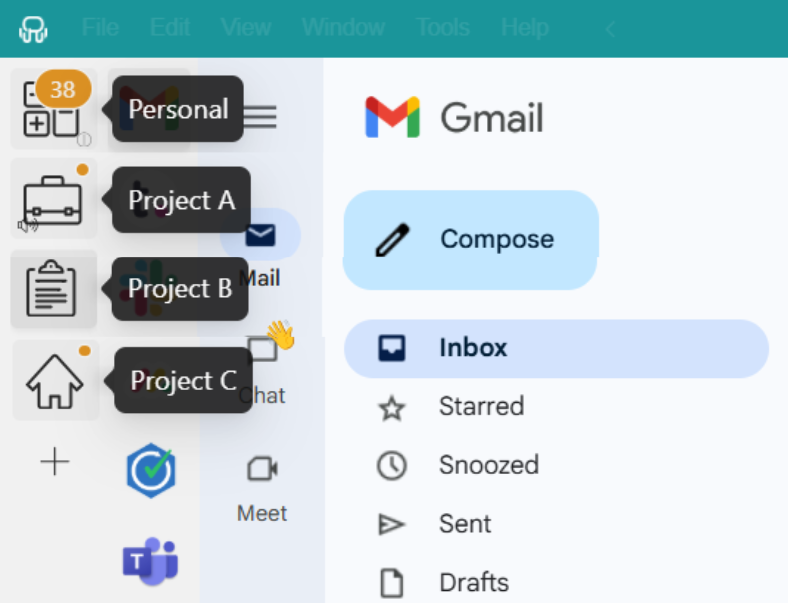
Rambox Workspaces make this super easy. They work like folders where you group your apps in a way that makes sense to you.
You can group your apps by project, by client, or by any other logic that fits how you work, so everything you need is always within reach.
For example, you might have one workspace with Gmail, Slack, Drive, and Notion for Project A, and another one with Jira, GitHub, and Teams for Project B. When you switch context, all the related apps are already together, without having to search for anything.
3. Control notifications instead of letting them control you
Not every notification deserves your attention, and one of the fastest ways to lose focus is letting every app interrupt you the same way.
With Rambox, notifications are fully customizable, so you decide what gets your attention and when. You can fine-tune notifications with a simple right click. For each app or workspace, you choose whether you want desktop notifications, sound alerts, or no notifications at all.
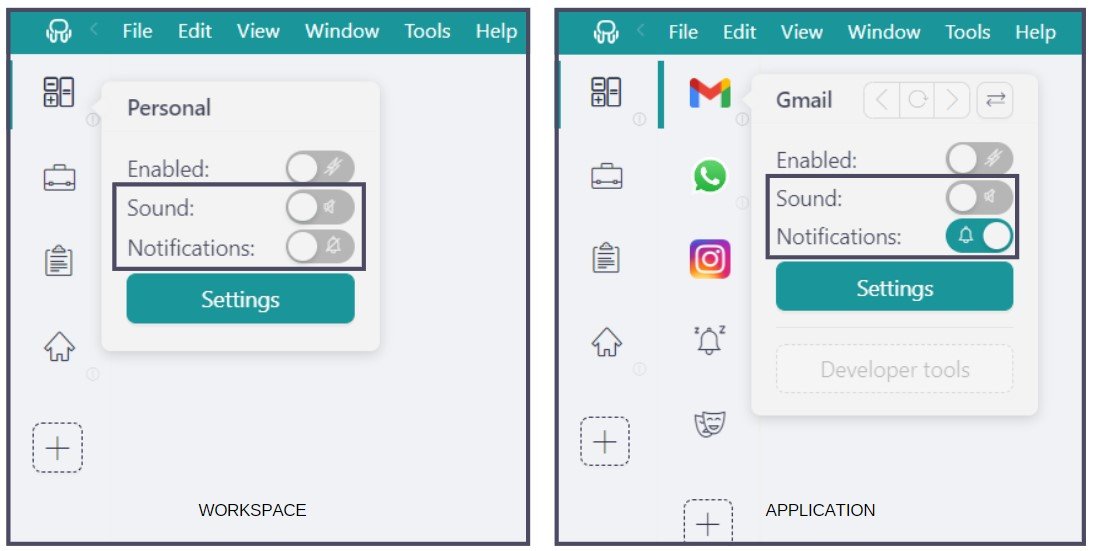
For example, you might mute all notifications from a workspace related to another client while you focus on your current project. Inside your active workspace, you can keep notifications on for critical apps like email and mute the rest to avoid constant interruptions.
And even when notifications are muted, Rambox still shows visual counters for unread messages, so nothing gets lost.
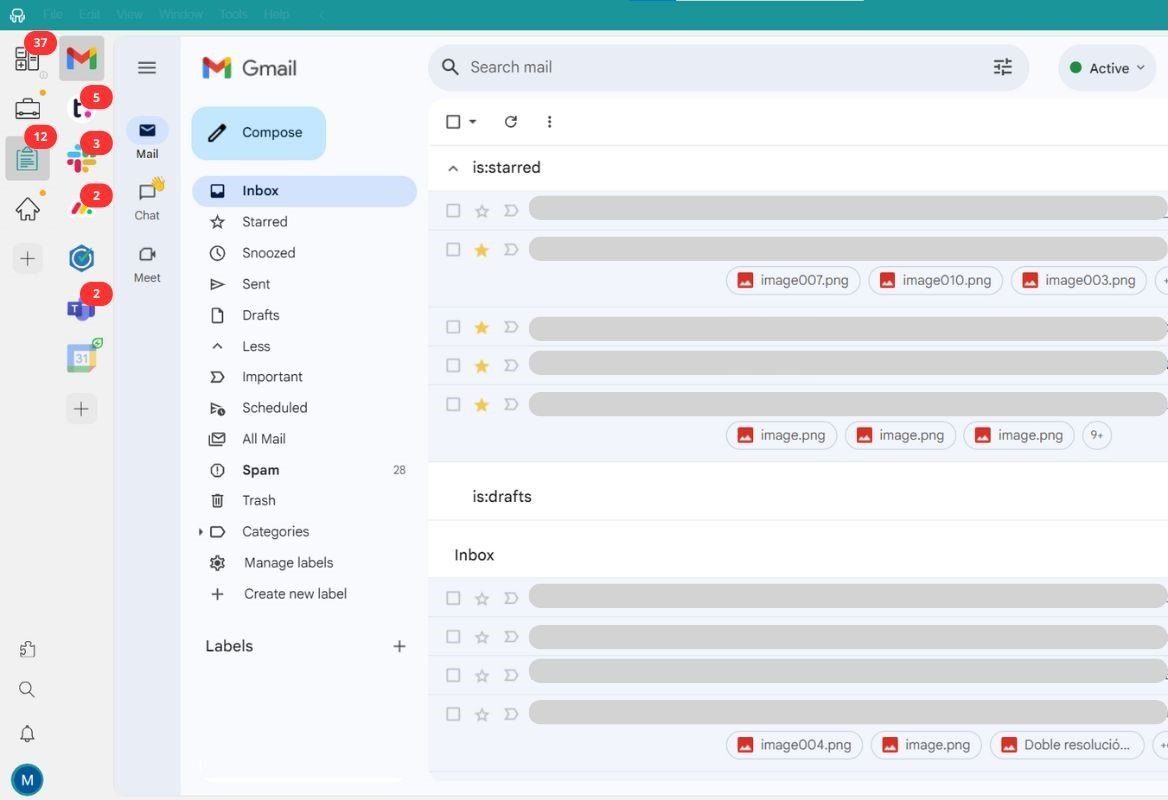
The result is simple: fewer interruptions, more control, and the ability to check messages on your own terms instead of reacting to every ping.
4. Batch messages to avoid living in email and chat
Even with notifications under control, messages can still take over your day if you respond as soon as they arrive. Constantly checking email and chat keeps your attention fragmented. Even quick replies pull you out of what you were doing and make it harder to get back into focus.
Batching messages means deciding when you check them, instead of reacting every time something arrives.
Practical Tip:
Start your day with a short message check of about 20–30 minutes to clear anything urgent. Do a second check around midday for 10–15 minutes, and a final one before finishing work. Outside of those moments, keep email and chat closed or muted.
This does not mean ignoring people. It means answering with intention instead of being constantly interrupted. When messages stop dictating your pace, your workday feels calmer and you can actually finish what you start.
5. Use your calendar as a visual map of your day
Once notifications and apps are under control, the next source of chaos is time itself. Many people only use their calendar for meetings, but that leaves most of the workday invisible.
Using your calendar as a visual map helps you see how your day is actually shaped. Not just calls and meetings, but also focus time, deadlines, and space to get real work done.
Blocking time for specific tasks makes it easier to understand what you can realistically handle in a day and what needs to wait. It also reduces the stress of feeling busy without knowing why.
Recommended calendar tools
✔️ Google Calendar / Outlook Calendar: Enough if you just need a clear view of meetings, deadlines, and time blocks.
✔️ Notion Calendar or Tweek: Useful if you prefer a lightweight, task driven view of your day.
✔️ Calendly or Acuity: Helpful when your work involves scheduling meetings with other people.
You can add all of these calendar apps to Rambox.
6. Turn big tasks into small actions you can finish
Big tasks feel heavy because they usually mix many things at once. They are not just “one task”, but research, decisions, coordination, and follow ups all bundled together. When your brain cannot see a clear starting point, it delays.
Instead of thinking in terms of outcomes, focus on actions. The goal is not to finish the whole thing, but to define the next step you can complete without friction.
Practical tip
Take 10 minutes at the start of the day to rewrite your biggest task into 3 to 5 small actions. Then block 45 minutes to complete just the first one.
Finishing small actions creates momentum. And momentum is what makes big work move forward.
7. Build simple routines that reduce daily decisions
A big part of feeling disorganized comes from having to decide the same small things over and over again. What to check first, where to start, what to do next. Those decisions add up and drain energy.
Simple routines remove that friction. When certain actions happen the same way every day, you free up mental space for actual work instead of constant decision making.
Practical tip
Create a short start of day routine you follow every morning. For example, open your home base, review today’s priorities, and block time for your most important task. Keep it simple and repeat it daily.
The goal is not to optimize every minute. It is to make your day predictable enough that you can focus without thinking about what comes next.
8. Clean your digital workspace on a regular basis
Digital clutter builds up quietly. Notes you no longer need, saved links you already used, apps that made sense at one point but no longer do. Over time, they stay there and make your workspace heavier than it needs to be.
Cleaning your digital workspace is about removing what no longer serves you. When your notes, saved resources, and apps are up to date, it is much easier to find what actually matters.
✔️ Once a week, take 10 minutes to review three things: your notes, your saved links, and the apps you actively use.
Rambox tip
Removing an app you no longer use in Rambox is very simple: Just right-click on the app, select the settings icon, and click Remove in the top right corner.
9. Prioritize your most important tasks each day
Not all tasks deserve the same attention. When everything feels urgent, you end up reacting all day and making progress on nothing that truly matters.
Daily prioritization is about choosing on purpose. It means deciding what will make the day feel successful before the day starts filling up with requests and messages.
Practical tip
At the start of the day, write down one to three tasks that really matter. These are the tasks that, if completed, would make the day feel productive even if nothing else gets done. Schedule time for them first, before checking everything else.
When priorities are clear, decisions become easier and your workday feels far more controlled.
10. Do a short weekly reset to start organized
Even with good daily habits, things pile up during the week. Tasks move, priorities change, and small loose ends accumulate. Without a reset, you start the next week already feeling behind.
A short weekly reset helps you close the week cleanly and start the next one with clarity. It is not about planning everything in detail, just about clearing noise and deciding what really matters next.
Practical tip
At the end of the week, block 15 to 20 minutes to review what is still open. Close tasks that are no longer relevant, move unfinished ones to the right place, and write down the top priorities for next week.
Starting Monday knowing what deserves your attention makes a bigger difference than trying to get organized in the middle of a busy day.
Today’s digital workday feels busy for a reason. It’s not just a feeling. It comes with real, measurable losses in time and productivity. Studies show that the more tools you juggle, the more interruptions you face, and the more often you switch between tasks, the less work you actually get done.
| Problem | Key data | Source |
| Time lost to app and context switching |
|
Harvard Business Review |
| Slow recovery after interruptions | Resuming a task after being interrupted can take up to 20 minutes to regain full focus. | Corexta |
| Productivity loss from context switching | Frequent switching can reduce productivity by up to 40% compared to focused work. | Productivity Gladiator |
| Cognitive overload from juggling tasks | Each additional context can reduce effective working time by 20–80%. | Product Focus |
| Economic cost of interruptions | Interruptions cost companies worldwide an estimated €58 billion per year in lost productivity. | Next Work Innovation |
| Real time wasted per worker |
|
Next Work Innovation |
What do these numbers really mean?
- You spend hours just transitioning between tasks.
- What looks like a full workday often yields much less output.
- Organizations pay for inefficiencies in real money and real hours.
Extra Rambox tips to be more organized at work
Beyond the habits and workflows we covered above, Rambox includes a few extra features that help you keep things organized while you are already working. They are not new systems to set up. They simply make your day easier once everything is in motion.
Here are the ones that really make a difference.
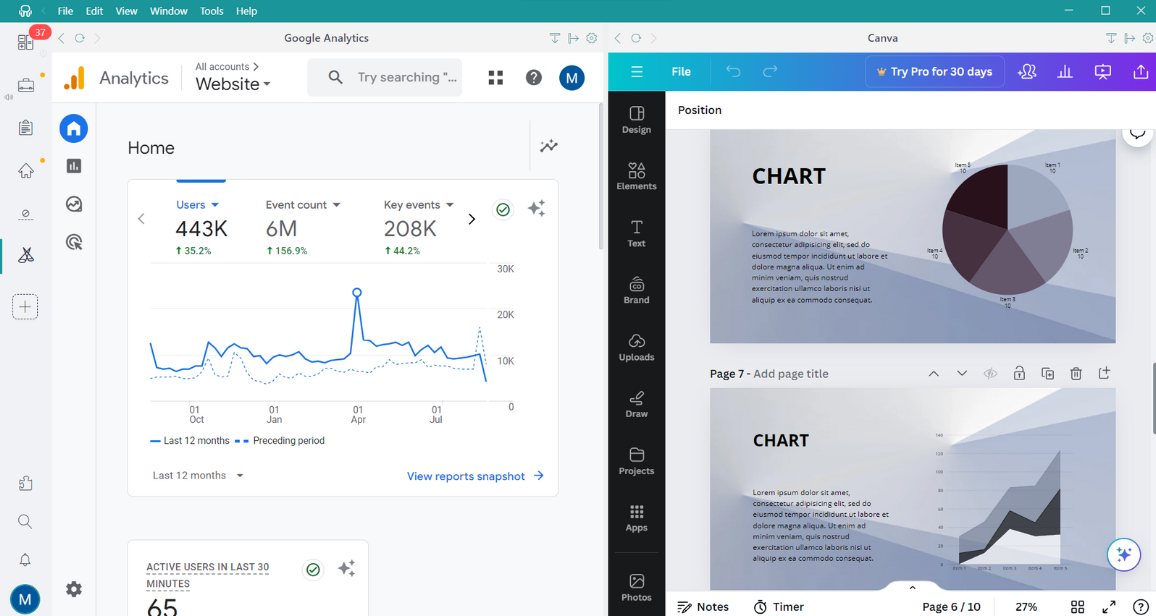
- Tiles layout: With the Tiles layout, you can display several apps vertically or horizontally on screen at the same time and get a quick overview at a glance. It works well as a reference view to check your calendar, inbox, or other key apps without jumping back and forth.
- Extensions inside your apps: Rambox lets you add a curated set of Chrome extensions directly inside your apps. This helps reduce small but constant friction during the day. Password managers speed up logins, grammar tools help while writing messages, translators avoid switching tools, dark mode reduces eye strain, and ad blockers remove visual noise. If you want to see Extensions in action, watch the following video.
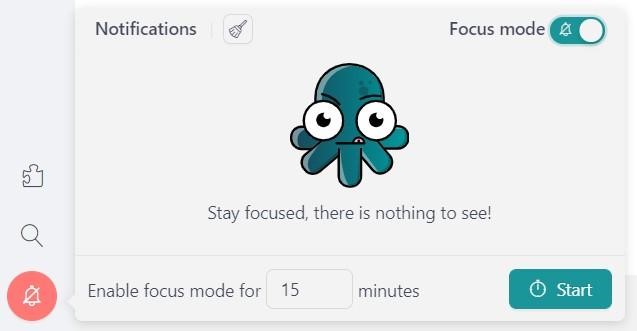
- Focus Mode: When you need to concentrate, Focus Mode silences all notifications and sounds across Rambox. You can turn it on manually or set it as a timed focus session, so notifications come back automatically when the time is up.
These features are not meant to replace the habits you have built. They support them.
If you want a calmer, more organized way to work, try Rambox for free! You can download it on Windows, Mac or Linux.

FAQs about how to be more organized at work
How can I be more organized at work when I’m overwhelmed
Start by choosing one single place to begin your day and decide one to three priorities only. Reducing where you start and what you focus on lowers the mental load immediately and gives you back a sense of control.
What’s the best way to organize my work tasks
The best approach is to stop treating tasks as big outcomes and break them into small, clear actions. When a task has a visible next step, it becomes easier to start and finish. Combine that with daily prioritization and you avoid long to do lists that never move.
How do I stay organized when working remotely
Remote work adds more tools and more interruptions. Staying organized means being intentional about structure. Centralize the apps you use every day in Rambox, decide when you check messages, and use your calendar to make your time visible. Without that structure, work quickly turns reactive.
How do I organize my digital workspace for work
A good digital workspace is one where you always know where things live. Group your apps by context in Rambox, keep notes and saved links up to date, and remove tools you no longer use. A short weekly cleanup prevents clutter from building up and makes it easier to find what matters.
How do I manage multiple projects without getting lost
Managing multiple projects becomes easier when each one has a clear space and a clear focus. Keep related apps and information together, decide daily priorities instead of juggling everything at once, and review progress weekly. This helps you switch between projects with intention instead of confusion.