
TickTick and Todoist have been two of the most popular to-do apps for years, and after using them, it’s easy to see why. Both are reliable, cross-platform, and packed with ways to keep your tasks under control, but they approach productivity differently. So in a contest of TickTick vs Todoist, who wins?
Whether you want a minimal, distraction-free task manager or an all-in-one productivity setup, the right pick depends on how you prefer to work.
Here’s how both apps compare in the areas that matter most.
Contents
- TickTick vs Todoist at a glance
- Ease of use: Which one feels faster and simpler every day?
- Productivity tools and advanced features: Which app helps you get more done?
- AI and automation: Which one feels smarter?
- Collaboration and integrations: Which one connects better with your workflow?
- TickTick vs Todoist: Pricing comparison
- Which one runs more smoothly?
- TickTick vs Todoist: Which one is better for you?
- TickTick vs Todoist: Final verdict
- Bonus: A better way to keep all your apps and notes together
- FAQ about TickTick vs Todoist
- Is TickTick better than Todoist for power users?
- Which app has better natural language processing?
- Which app offers the best free plan?
- Does either app include built in habit tracking or a Pomodoro timer?
- Do TickTick and Todoist work offline?
- Can you automate tasks in TickTick or Todoist?
- Which app is better for teams?
TickTick vs Todoist at a glance
Before diving into the details, it helps to see how both apps compare side by side. This quick overview gives you a clear idea of what each one does best and where they feel different when you use them every day.
| TickTick | Rating TickTick | Todoist | Rating Todoist | Who wins | |
| Interface | More tools on screen and a fuller layout | 4/5 ⭐ | Cleaner, lighter and easier to navigate | 5/5 ⭐ | Todoist |
| AI | No native AI features | 0/5 ⭐ | Built in AI for suggestions and planning | 4/5 ⭐ | Todoist |
| Productivity features | Habit tracking, Pomodoro timer, calendar view, Eisenhower Matrix | 5/5 ⭐ | Simpler task system with fewer extras | 3/5 ⭐ | TickTick |
| Collaboration | Works well for small teams | 3/5 ⭐ | Stronger setup for shared projects | 4/5 ⭐ | Todoist |
| Integrations | Works well through external services | 3/5 ⭐ | Wider native ecosystem | 4/5 ⭐ | Todoist |
| Calendar | Full calendar built in | 5/5 ⭐ | Works mainly with external calendars | 2/5⭐ | TickTick |
| Customization | More views and layouts | 4/5 ⭐ | Very straightforward | 3/5 ⭐ | TickTick |
| Pricing | Feature rich lower tiers | 4/5 ⭐ | Strong free plan | 5/5 ⭐ | Todoist |
Ease of use: Which one feels faster and simpler every day?
Todoist feels easier from the moment you open it. Its layout is clean, every element has space to breathe and adding tasks takes only a second thanks to its natural language input. You type what you need and the app understands the date, the priority and even the project without extra clicks. Moving around the interface also feels smooth, which helps when your task list starts getting long.

Source: Todoist.com
TickTick offers more options on screen, so it can feel a little fuller at first. The app gives you many tools at the same time, including habits, timers and a wide set of views. Once you get used to it, everything is within reach and it becomes very quick to work with. The learning curve is slightly longer, but the app rewards you with more flexibility once you understand where things are.

Source: TickTick.com
✔ Todoist feels simpler and faster for everyday use.
✔ TickTick gives you more tools, which can feel powerful once you get comfortable with it.
Productivity tools and advanced features: Which app helps you get more done?
This is where both apps start to feel very different.
TickTick brings many productivity tools together in one place. You can track habits, use a Pomodoro timer, plan your week with a full calendar view and even organize priorities with an Eisenhower Matrix. All of this sits inside the same app, so you can jump from tasks to time tracking or habits without opening anything else. If you enjoy having everything connected, TickTick gives you a very complete workspace.

Todoist takes a lighter approach. It focuses on tasks and does that very well. You can add labels, filters and sections to keep everything organized, and the interface makes it easy to stay focused on what matters. It does not include habits, timers or built in calendars, so if you need those, you will depend on external tools. The benefit is that the app stays simple and very clean, which many people prefer.
✔ TickTick wins if you want many productivity tools in one place.
✔ Todoist wins if you prefer a focused task manager that stays simple and distraction free.
AI and automation: Which one feels smarter?
Todoist takes a clear lead in this area. Its built in AI can break large tasks into smaller steps, suggest improvements and help you rethink your plan when things start to pile up. It works inside the task editor, so you can use it without interrupting your flow. It is not perfect and sometimes needs a little fine tuning, but it gives you helpful ideas and reduces the effort of planning everything yourself.

Source: Todoist.com
TickTick does not include native AI tools. You can automate tasks through external services, but the app itself does not offer suggestions or planning assistance. The focus stays on traditional productivity features like habits, calendars and timers, which work very well but do not offer the same kind of smart support.
✔ Todoist feels smarter thanks to its built in AI.
✔ TickTick stays manual, which some users prefer if they want full control.
Collaboration and integrations: Which one connects better with your workflow?
Todoist offers the stronger setup for collaboration, especially if you work with shared projects. It is easy to assign tasks, keep conversations organized inside each item and stay updated with activity notifications. The app also connects with a wider range of services, so it fits naturally into work environments that depend on multiple tools. This makes it a solid choice for teams or anyone who needs a reliable shared task system.
TickTick also supports collaboration, but it feels more suited for smaller groups. Sharing lists works well and the app handles updates smoothly, although it does not offer the same structure that Todoist has for team projects. In terms of integrations, TickTick relies more on external services to connect with other apps, which works fine but does not feel as deep or native.
✔ Todoist fits better in collaborative workflows and offers broader integration options.
✔ TickTick works well for simple shared lists and personal organisation across apps.
TickTick vs Todoist: Pricing comparison
When it comes to pricing, both apps offer a free plan, but the paid tiers are where the differences really show.
| What you get | Price | |
| TickTick Free | Basic to-do features, calendar view limited, basic lists | Free |
| TickTick Premium | Full calendar features, advanced filters, folders, historical statistics, reminders for check items, estimated Pomodoro, premium themes, white noises, widgets, Quick Ball on Android | $35.99/year |
| Todoist Free | Basic task management, limited projects, limited filters, short activity history | Free |
| Todoist Pro | Calendar layout, task duration, custom reminders, unlimited activity history, AI task assist | $60/year |
| Todoist Business | Shared workspace, team roles and permissions, advanced activity logs, shared templates | $96/year |
✔ TickTick offers more features at a lower yearly price if you want everything included.
✔ Todoist costs more but focuses on clean task management, AI support and structured team features.
Which one runs more smoothly?
When you use a to do app every day, smooth performance is not a bonus, it is the baseline.
Todoist feels more stable in everyday use. Switching between devices is seamless, changes sync quickly, and the app stays light even when your task list grows. Whether you are on desktop or mobile, everything behaves in a predictable way, which makes it easy to trust the app and forget about the tool itself.
TickTick also runs well, but its feature heavy approach can make it feel slightly busier. With habits, Pomodoro, calendar views, and extra panels all available, the app does more at once, and that can sometimes affect how smooth it feels, especially with large lists or on less powerful devices.
✔ If you care most about speed, consistency, and not having to think about performance at all, Todoist has the edge.
TickTick vs Todoist: Which one is better for you?
At this point, the choice comes down to how you like to work and how much structure you want around your tasks.
- Todoist works better if you want clarity first. It keeps task management simple, feels calm to use, and helps you stay focused on what matters today without getting distracted by extra tools. It also scales nicely if you start working with others or need stronger collaboration and integrations later on.
- TickTick makes more sense if you enjoy having everything in one place. If you like tracking habits, using a Pomodoro timer, planning visually with a built in calendar, and experimenting with different ways to organize your work, TickTick gives you more to play with inside a single app.
Neither approach is right or wrong. One prioritizes focus and flow, the other prioritizes control and flexibility. The better option is simply the one that matches how you naturally manage your day.
TickTick vs Todoist: Final verdict
Both apps do a great job at what they are supposed to do: help you stay on top of your tasks. The difference is not about quality, but about approach.
Todoist wins if you value simplicity, speed, and a clean experience that stays out of your way. It is easier to pick up, easier to trust day to day, and works especially well if you want solid task management without extra noise.
TickTick is the better choice if you want an all in one productivity setup. It offers more built in tools and more ways to organize your work, which can be a big plus if you enjoy fine tuning how you plan your time.
Bonus: A better way to keep all your apps and notes together
It does not really matter if you use TickTick or Todoist. In real life, your tasks are only one part of your day.
This is where Rambox fits naturally.
Rambox lets you keep all those apps together in a single interface. Your task manager sits next to your email, project manager, and whatever else you use daily, so you stop losing time opening tabs and changing windows.

You can even:
- Organize your apps by project or client.
- Get notifications and updates in real time, without losing focus.
Adding TickTick or Todoist to your workspaces or your apps bar in Rambox is very easy. Just follow the steps below:
- Go to the workspace where you want to add an TickTick or Todoist app. Click on “+ Add an app or workspace.”
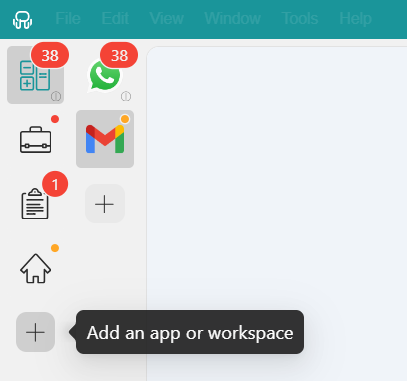
- Type “TickTick” or “Todoist” in the search panel on the left.

- Configure the application settings to your liking. Remember that you can choose a profile for the app (inherit from workspace, primary, private, incognito, or custom).

- Click “Add,” and you’re done! Your app is now part of your Rambox workspace. It’s that simple!
Sounds good, right? Try Rambox for free! Just sign up, download the app and you can start enjoying all its features. No cards, no cheating, it’s that simple!
FAQ about TickTick vs Todoist
Is TickTick better than Todoist for power users?
In many cases, yes. TickTick includes more built in tools like a calendar, habit tracking, Pomodoro timer and advanced views. If you like having many productivity features in one place and tweaking how you work, TickTick usually feels more powerful.
Which app has better natural language processing?
Todoist. Its natural language input is more reliable and flexible when adding tasks with dates, times and recurring rules.
Which app offers the best free plan?
Both free plans are useful, but they are different. TickTick’s free plan includes more built in productivity features, while Todoist’s free plan feels cleaner and easier to manage. If you want more tools without paying, TickTick has an edge.
Does either app include built in habit tracking or a Pomodoro timer?
Yes, but only TickTick. It includes habit tracking and a Pomodoro timer as native features. Todoist does not offer these tools inside the app and requires external apps or integrations if you need them.
Do TickTick and Todoist work offline?
Yes. You can add, edit and complete tasks in both apps without an internet connection. Once you are back online, everything syncs automatically.
Can you automate tasks in TickTick or Todoist?
Yes, but mainly through third party services like Zapier. This lets you connect tasks with calendars, email or other apps, but automation is not deeply built into either tool by default.
Which app is better for teams?
Todoist. It offers a stronger setup for shared projects, clearer task assignment and a wider range of integrations that teams often rely on. TickTick supports collaboration too, but it is better suited for small groups or simple shared lists rather than structured team workflows.