

If your workday involves switching between Slack, Microsoft Teams, WhatsApp and Telegram, keeping conversations and client accounts straight can be difficult, but an all-in-one messaging app can make those channels easier to manage from your desktop.
Some tools bring conversations into a unified inbox, while others keep individual apps and accounts organized in one window. This guide compares six desktop options for professionals and explains when messaging alongside tickets, projects or email is more useful than collecting chats alone.
Quick Comparison of the Best All-in-One Messaging Apps for Desktop
Start with the type of experience your work requires: a unified inbox or your usual apps side by side. Prices and plan limits below reflect official information reviewed in October 2026. Prices come straight from each provider’s site, so what you pay may vary by country and tax.
| App / best for | Approach | Multiple accounts | Desktop OS | Entry plan / listed price (USD) |
|---|---|---|---|---|
| Rambox Messaging + work apps |
Separate apps/workspaces | Pro: multiple accounts with Profiles | Win / Mac / Linux | Pro $7/mo or $70/yr; 30-day trial |
| Beeper One inbox |
Unified messaging inbox | Free: 1 per network. More on Plus | Win / Mac / Linux | Free up to 5 total; Plus $9.99/mo |
| Franz Messaging-focused hub |
Separate services in one app | Separate services, limits by plan | Win / Mac / Linux | Starter free: 3 services; Pro $60/yr (about $5/mo) |
| Ferdium Open-source choice |
Separate services/workspaces | Yes, duplicate services | Win / Mac / Linux | Free, open source |
| Singlebox Multiple chat accounts |
Separate web apps/accounts | Yes, separate sign-ins | Win / Mac | Basic free (2 profiles), Pro $5/user/mo, billed yearly. |
| Shift App-based browser |
Browser Spaces and apps | Account-based Spaces | Win / Mac | Free: 5 Spaces, Advanced $199.99/yr |
What Does an All-in-One Messaging App Actually Do?
In practice, these apps follow one of two models:
Unified Messaging Inboxes
A unified inbox collects chats from supported networks into one messaging interface. With Beeper, for example, you can read and reply across connected services without opening separate tabs. That is convenient when the priority is keeping track of multiple conversations.
The trade-off is that each network’s supported features, connection method, and account limits may differ.
Multi-App Desktop Workspaces
A multi-app desktop hub places services side by side while preserving their own interfaces. Rambox, Franz, Ferdium and Singlebox follow variations of this model, while Shift takes a browser-first approach.
These tools can suit people who use messaging alongside Gmail, calendars or other web apps, but they don’t merge your chats into one inbox.
How We Selected These Apps
We compared each tool using its own website, help center and published plans, looking at desktop support, the services it connects, how it separates accounts and the limits of its plans.
This is a documentation-based comparison, not a hands-on test, so performance is not part of it. When a feature or plan term isn’t clear in the documentation, we say so rather than assume it works as advertised.
The 6 Best All-in-One Messaging Apps for Desktop
1. Rambox: Best for Organizing Messaging and Work Apps by Client or Project
Rambox is a desktop workspace manager for professionals and teams who use multiple apps, accounts and work contexts. You can bring messaging services such as WhatsApp and Slack together with Gmail, calendars, ticketing systems or project tools, without replacing those services or merging their conversations.
What sets Rambox apart is that it keeps things separate as well as together. With Rambox Pro, Workspaces group the apps you need by client, project or role; Profiles help keep sign-in sessions separate. You can set notifications per app or per workspace, and Focus Mode pauses them when you need to concentrate.
That helps when your morning goes from answering clients on WhatsApp to checking support tickets and then switching to an internal project.
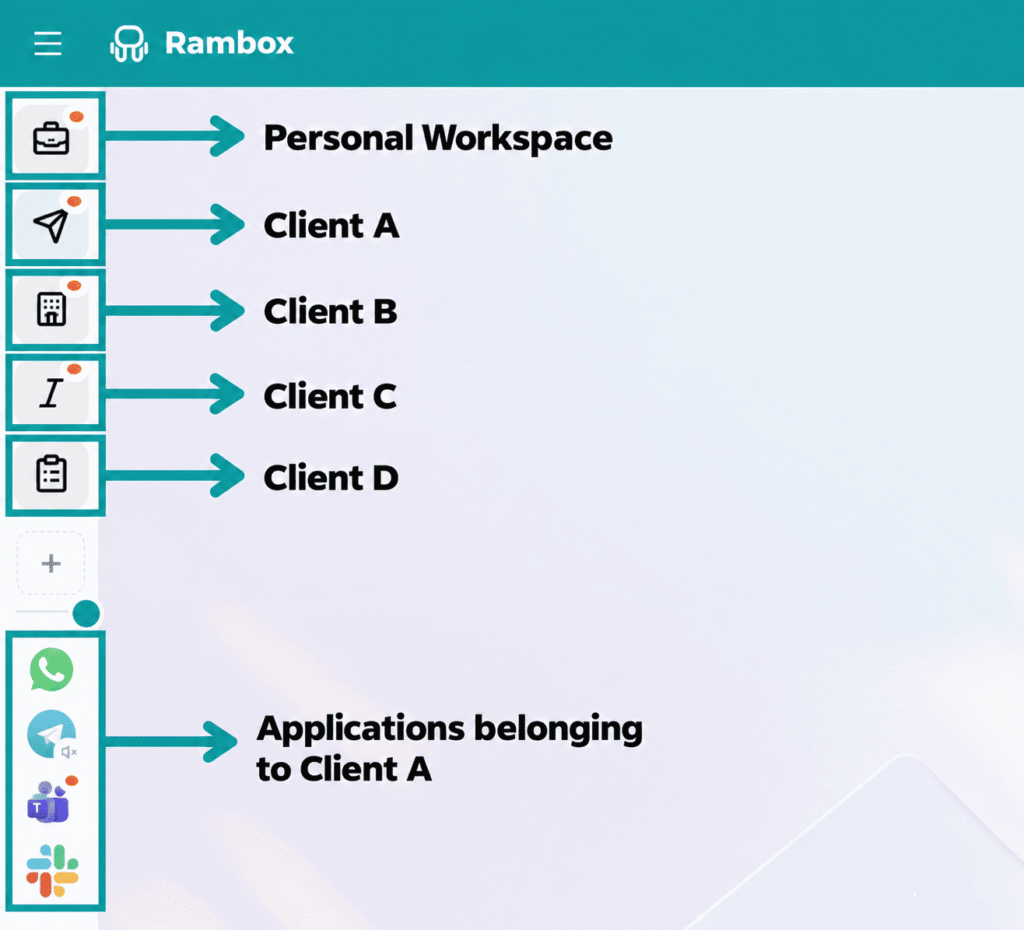
Best for: professionals, agencies and teams that switch between clients, accounts and tools during the day.
Limitations: it does not merge messages from different networks into one inbox; each service retains its own interface and conversations.
Platforms: Windows, macOS and Linux.
Price: Rambox Pro is listed at $7/month or $70/year, with a 30-day trial that requires no card. A free Rambox Basic plan is also available with limited features.
Want to see how it works with your own apps? Start a free 30-day Pro trial.
2. Beeper: Best for a Unified Messaging Inbox
If you would rather open one conversation list than six distinct services, Beeper is the clearest match in this comparison. It brings supported networks, including WhatsApp, Telegram, Instagram, Discord and Slack, into a shared chat interface. Desktop apps are available for Windows, macOS and Linux, and it also offers mobile apps.
Beeper is more than a collection of web tabs: its purpose is to let you manage chats across networks. That makes it attractive for people who primarily need to read and answer messages. However, not every platform feature is necessarily reproduced, and the connection method can affect capabilities and privacy considerations.
Best for: people whose main goal is one place to read and reply to chats.
Limitations: supported services and features vary, and free users can connect one account per network, up to five accounts overall.
Platforms: Windows, macOS and Linux.
Price: Free; Beeper Plus starts at $9.99/month and allows more accounts, subject to network-specific limits.
3. Franz: Best for Keeping Messaging Services Together
Franz is a desktop hub built around communication. It supports services such as WhatsApp, Slack, Telegram, Signal and email, and lets you move between them in one app. Workspaces and custom services extend that setup beyond a basic messenger list.
Franz now emphasizes additional features, including optional AI-assisted workflows and message follow-up. Those may appeal to users who spend a substantial part of the day chatting, but they are not necessary for someone who only wants a small collection of services.
Best for: people who want several communication services close at hand.
Limitations: the free Starter plan covers only three services and one workspace, so larger setups require payment.
Platforms: Windows, macOS and Linux.
Price: Starter is free; Pro is listed at $60/year (about $5/month when billed annually).
4. Ferdium: Best for Open-Source Messaging Management
Ferdium takes a community-driven approach to keeping services in one place. You can add multiple instances of the same service, arrange them into Workspaces and create a custom service when your preferred web app is not in the catalog. It also offers options such as notifications, a to-do panel and use without an account.
Its open-source model matters if you value customization or want to follow how the project is developed. Public releases also provide a way to follow maintenance and fixes. That flexibility may be less appealing if you prefer a product with a clearly packaged commercial support plan.
Best for: users who favor free, configurable desktop software.
Limitations: service behavior can depend on individual web apps and community-maintained integrations.
Platforms: Windows, macOS and Linux, with additional builds available.
Price: Free and open source.
5. Singlebox: Best for Keeping Multiple Chat Accounts Separate
Singlebox is another messaging-oriented desktop app for people who keep several chat and email accounts open.
Its current site describes separate sign-ins for different clients or for work and personal use, unread badges, notification controls and an app lock. It positions messaging, email and related web tools side by side rather than claiming that every conversation appears in one universal inbox.
Singlebox comes from the same developer as WebCatalog and shares its account and subscription. That makes it a relevant option if your main difficulty is switching accounts rather than finding a cross-network conversation.
Best for: individuals and freelancers managing several accounts.
Limitations: the free Basic plan is limited to two profiles. Service-specific behavior still needs a hands-on check.
Platforms: Windows and macOS.
Price: Basic is free and Pro is listed at $5 per user/month, billed annually, with a 7-day trial.
6. Shift: Best for Browser-Based Communication and App Workflows
Shift is a browser built around Spaces and web apps. You can group communication services, inboxes and other websites into different browsing contexts, making it useful when your desktop workflow already revolves around browser-based tools.
Shift is a broader productivity browser, not a dedicated merged messenger inbox, which is a strength for some users and a mismatch for others. If you spend most of your time on web apps and want a browser tailored to different roles or projects, it belongs on the shortlist.
If you only want to read messages across networks, start with a chat-focused tool instead.
Best for: people who want messaging within a customizable browsing environment.
Limitations: the free plan has limits on Spaces and apps.
Platforms: Windows and macOS.
Price: Free includes up to five Spaces and ten apps per Space. Advanced is listed at $199.99/year.
Other All-in-One Messaging Options Worth Considering
Two familiar names deserve a note, but not an unconditional recommendation.
IM+ still presents itself as an all-in-one messenger, but its active development appears focused on mobile: the iOS app was updated in January 2026, while the Windows listing linked from its site was unavailable and the Mac app was not listed in the Mac App Store when we checked.
All-in-One Messenger continues to offer version 2.5.0 installers for Windows and macOS (2.0.0 for Linux), but its site shows no release dates and the Mac build needs Rosetta 2 on Apple Silicon, which leaves current compatibility uncertain.
For broader app management, Wavebox and WebCatalog (from the same developer as Singlebox) are also relevant, but they are not direct substitutes for a unified chat inbox. Slack and Mattermost, meanwhile, are team communication platforms, not tools that automatically gather all your external messengers.
ClickUp combines team chat with its own tasks and project management, but it is not a hub for bringing your existing WhatsApp, Telegram and Slack accounts into one window.
How to Choose the Right All-in-One Messaging App
Start with the outcome you need, not the longest feature list. If the problem is scattered conversations, look first at whether a unified inbox supports the exact networks you use. If there are too many logins or overlapping projects, focus instead on separate sessions, multiple accounts and workspaces.
- Your services: list the networks you need for work, including WhatsApp, Telegram, Slack, Microsoft Teams and email. Check that the app supports the features you use, not just the service itself. If you’re still deciding which messaging services to use, our guide to the best messaging apps for Windows compares the individual apps.
- Your account setup: check whether you need two numbers, multiple client logins or more than one account on the same network. Verify the limits of the actual plan.
- Your desktop: check that the app works with your operating system and supports the sign-in methods, calls and notifications you rely on.
- Your work context: ask whether you are managing conversations alone or also the tickets, projects and documents connected to them.
A free plan may be enough if you only use a few messaging apps for work. But if you manage several clients or handle customer support, keeping accounts and workspaces separate may be more useful than having access to hundreds of services.
You may not need another app at all. Chrome profiles and Firefox containers can keep accounts separate, and tabs or installed web apps may be enough for a simple setup.
A dedicated hub makes more sense when you want messaging, notifications and client or project spaces organized in one place. Neither option is automatically lighter or faster; that depends on the apps you use.
When Messaging Is Part of a Bigger Workflow
A message often leads to another task. A support request becomes a ticket, and a client approval needs a project update. In these cases, keeping the relevant communication and work apps in the same context can be more useful than a messaging-only dashboard.
A consultant working with several clients might use different Gmail accounts, WhatsApp conversations and project boards. With Rambox Pro, Workspaces can organize apps by client, while Profiles help keep account sessions separate where configured. That is a different benefit from simply having every message open at once.
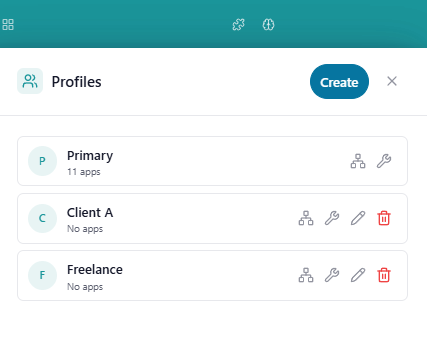
Rambox does not connect these apps or sync their data: each one keeps doing its own job.
FAQs
Can I Use Two WhatsApp Accounts on One Computer?
Yes, some desktop hubs let you add the same service more than once with separate sessions. With Rambox Pro, Profiles help manage separate sign-ins for multiple instances of the same app. Each WhatsApp account still needs to meet WhatsApp’s own sign-in requirements. See our guide to managing multiple accounts on one computer.
Do I Need My Phone to Use WhatsApp in a Desktop App?
Yes, at least for the first sign-in. WhatsApp requires your primary phone to register your account and link new devices, either by scanning a QR code or by entering your phone number. Once a device is linked, your phone does not need to stay online, but WhatsApp logs linked devices out if you don’t use your phone for over 14 days.
These rules come from WhatsApp itself, so check its Help Center for the current limits.
Is There a Free All-in-One Messaging App I Can Use on My Desktop?
Yes. Rambox offers a free plan, as do Beeper, Franz, Ferdium, Singlebox and Shift. However, each free version has different limits on accounts, services and features. Check what’s included before choosing.
Is It Safe to Use WhatsApp or Slack in an All-in-One App?
Safety depends on how the tool connects to each network, stores sessions and handles permissions and updates. Before you commit, check its privacy documentation, whether it connects from your device or through the provider’s cloud, and each messaging platform’s terms.
Do not assume that every all-in-one app keeps all the security and privacy features of the native client.
Can I Keep Different Clients’ Messaging and Work Apps Organized?
Yes. In Rambox Pro, separate Workspaces can group messaging, email and project tools for each client or project. Profiles help manage the sessions used for those accounts, while each app still keeps its own conversations and data.
Final Verdict: Which All-in-One Messaging App Should You Choose?
Rambox Pro is built for both sides of a working day. It brings messaging and the rest of your work into one desktop environment. It keeps WhatsApp, Telegram, Slack and other communication apps alongside Gmail, calendars, project boards and support desks.
Workspaces organize apps by client, project or role; Profiles help manage separate accounts, and Focus Mode lets you pause notifications when you need to concentrate. Rambox is available for Windows, macOS and Linux.
Try Rambox Pro free for 30 days, no credit card required, and see how it fits the way you work.