Last Updated: September 15, 2026
If you work in the corporate world or simply communicate across several platforms every day, messaging can get messy fast. Teammates may use one app, clients another, and friends or family something completely different. With so many options available, finding the best message apps for Windows can feel overwhelming.
For this 2026 ranking, we looked at more than popularity alone. We considered Windows support, messaging and collaboration features, privacy, everyday usability, and how well each app fits personal or professional workflows.
Where relevant, we also use anonymous, aggregated Rambox usage data as an additional signal. In our August 2026 Rambox ranking, WhatsApp ranked fifth among all apps and Telegram ranked thirteenth.
Rambox itself is not included in the Top 10 because it serves a different purpose: rather than replacing WhatsApp, Telegram, Slack, or other messaging services, it helps you organize multiple communication and work apps in one desktop workspace.
How to manage all your communication apps?
Before we dive into the list, let’s talk about how to keep your chats under control. Chances are you use multiple communication apps on Windows every day. You might collaborate with your team on one platform, talk to clients on another, and use a completely different app for personal messages.
That’s where Rambox comes in. It brings your web-based communication and work apps together in one desktop interface. Rambox includes more than 700 predefined apps, and if a web app is not already in the catalog, you can often add it as a Custom App.
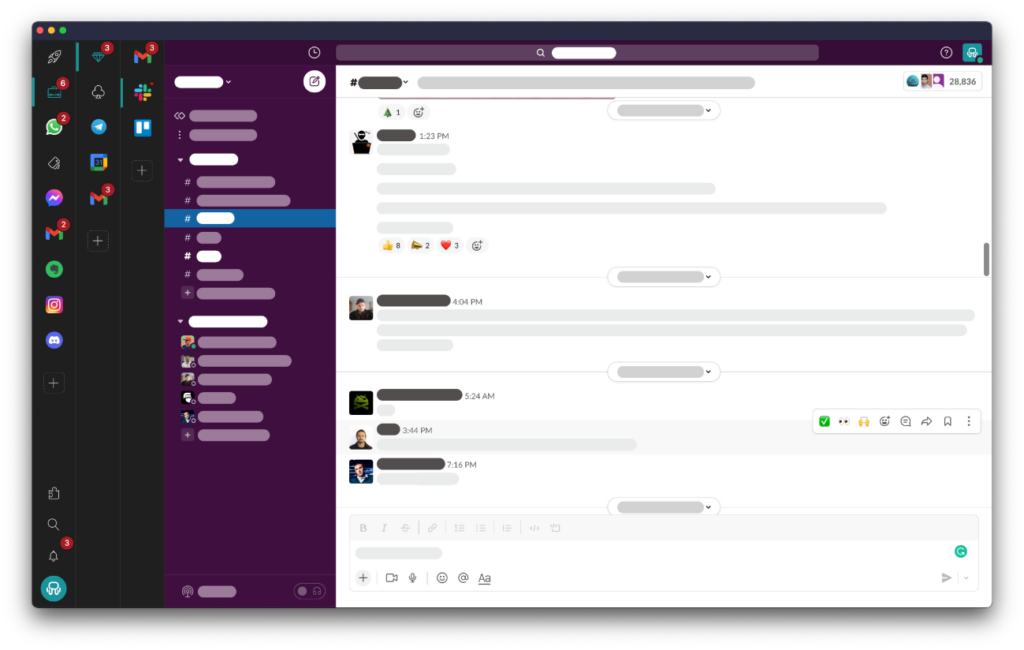
You can also control notifications by app or Workspace and use Focus Mode when you need to reduce interruptions. That makes it easier to keep several communication tools available without letting every notification compete for your attention.
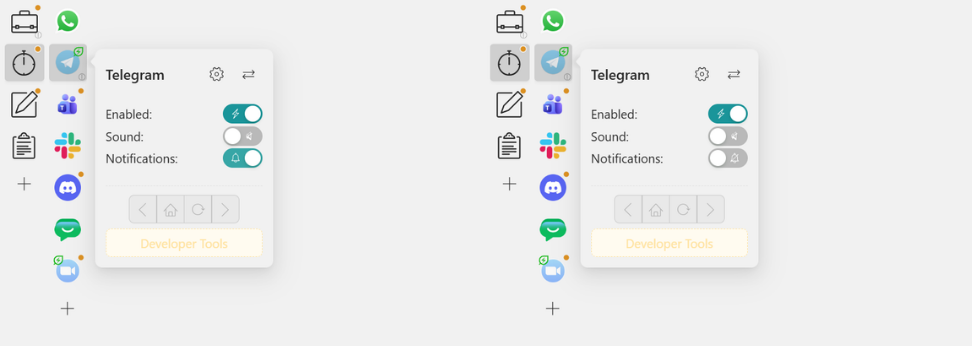
Want to try the setup yourself? Try Rambox Pro free for 30 days. New accounts can test Pro without a credit card, and you can download Rambox for Windows to start organizing your apps.
Top 10 best message apps for Windows in 2026
The best option depends on whether you need everyday messaging, team collaboration, stronger privacy, or more control over your organization’s communications. Here are our top picks for Windows in 2026.
1. WhatsApp & WhatsApp Business
WhatsApp remains one of the strongest all-around messaging choices for Windows. Its desktop experience makes it easy to keep conversations available on your PC while supporting messaging, file sharing, voice calls, and video calls.
For professional use, WhatsApp Business is particularly useful for customer conversations and business accounts. If you manage more than one phone number or business account, keeping each session clearly separated becomes especially important.
You can learn more in our guide on how to manage multiple WhatsApp accounts on one PC.
WhatsApp also has the strongest current usage signal in our own data: in August 2026, it ranked fifth among all applications used in Rambox, not just messaging apps.
2. Telegram
Telegram is one of the best Windows messaging apps for users who value speed, communities, channels, bots, and large file sharing. Its desktop app feels lightweight and works especially well if you participate in several groups or communities.
Telegram also offers extensive privacy controls, but there is an important distinction: end-to-end encryption is used in Secret Chats, not in standard Telegram cloud chats. If end-to-end encryption by default is your main priority, Signal is the stronger choice later in this list.
If you need several Telegram sessions, check out our guide on how to manage multiple Telegram accounts on one PC.
Telegram ranked thirteenth among all apps in Rambox in August 2026, making it the second messaging-first application to appear in our current global Top 15 after WhatsApp.
3. Microsoft Teams
Microsoft Teams is one of the most natural messaging and collaboration choices for Windows-based organizations, especially when the company already works with Microsoft 365.
Teams combines direct messaging, group conversations, channels, meetings, file sharing, and collaborative work around Microsoft tools such as Outlook, Word, Excel, SharePoint, and OneDrive.
That makes it particularly effective when messaging is only one part of a broader workplace collaboration system.
If you’re choosing between two of the biggest workplace communication platforms, see our full Slack vs. Teams comparison.
4. Slack
Slack remains one of the strongest choices for organized team communication. Instead of putting every discussion into one continuous chat, it uses channels, threads, direct messages, and integrations to keep work conversations easier to follow.
Its biggest advantage is its ecosystem. Slack connects with a wide range of productivity and development tools, while workflows, bots, notifications, and Huddles help teams keep communication tied to the work they are already doing.
For startups, agencies, technology companies, and distributed teams, Slack remains one of the most flexible Windows messaging options.
5. Discord
Discord may have started with gaming communities, but it has grown into a versatile communication platform for online communities, study groups, projects, creators, and small teams.
Servers and channels keep conversations organized, while persistent voice channels make it easy for people to drop in and out without scheduling formal calls. Discord also supports video, screen sharing, direct messages, roles, and extensive community management.
If your communication revolves around an active community rather than a traditional company hierarchy, Discord can be a better fit than conventional workplace chat tools.
6. Signal
Signal is our top recommendation when privacy is the main priority. Messages and calls use end-to-end encryption by default, and Signal’s apps and encryption technology are open source.
Signal Desktop supports Windows 10 and Windows 11. The desktop application must first be linked to Signal on your Android phone or iPhone, so it works as part of an existing Signal account rather than as a standalone registration.
Its interface is much simpler than platforms such as Teams or Slack because Signal focuses primarily on private communication rather than workplace productivity features.
Signal is not currently part of Rambox’s predefined app catalog and does not offer a web client, so this is one application you should use through its dedicated Windows desktop app.
7. Google Chat
Google Chat is one of the most practical messaging tools for teams already working in Google Workspace. It integrates closely with Gmail, Google Drive, Calendar, Meet, and other Workspace services.
Teams can use direct messages and persistent Spaces for projects, share files, create tasks, start meetings, and collaborate without moving far from the rest of the Google ecosystem.
Google has also expanded Gemini features inside Chat, adding AI-assisted capabilities such as conversation summaries, message help, and other collaboration tools depending on the Workspace plan.
8. Zoom Workplace
Zoom is no longer only a video meeting tool. Zoom Workplace includes Zoom Team Chat, giving organizations persistent team messaging alongside meetings, calls, documents, and other collaboration features.
That makes it a particularly interesting option for businesses that already rely heavily on Zoom meetings and want to reduce the need for a separate messaging platform.
Zoom Workplace has an actively maintained Windows desktop app, and Team Chat supports direct conversations, channels, file sharing, and communication between meetings.
9. Lark
Lark takes an all-in-one approach to workplace communication. Instead of focusing only on messaging, it brings together Messenger, meetings, calendars, documents, and other collaboration tools inside the same platform.
This makes it useful for teams that want to reduce the number of separate tools they use for communication and productivity.
Lark also provides a Windows desktop client, so the experience is not limited to a browser or mobile device.
10. Mattermost
Mattermost is one of the strongest Windows messaging options for organizations that need greater control over their communication infrastructure and data.
It supports channels, direct messages, calls, file sharing, screen sharing, and multiple workspace or server connections from its desktop application. Mattermost is particularly relevant for technical teams, regulated industries, and organizations that prefer self-hosted or tightly controlled deployments.
Its Windows desktop application currently supports Windows 11 and newer systems.
The main difference from tools such as WhatsApp, Slack, or Discord is setup: Mattermost Desktop requires an existing Mattermost Server. This makes it less plug-and-play for individual users, but much more attractive to organizations that need control over where their communication environment runs.
If your Mattermost workspace is accessible through the web and it is not already available in the Rambox catalog, you can also use its server URL to create a Rambox Custom App.
What happened to Messenger for Windows?
Messenger appeared near the top of the previous version of this ranking, but the situation changed significantly after 2025.
Meta discontinued the standalone Messenger apps for Windows and macOS in December 2025. Messenger.com also stopped operating as a standalone desktop messaging site in 2026.
That doesn’t mean Messenger disappeared. If you have a Facebook account, you can still access your conversations through Facebook.com/messages from a browser or keep Messenger available as a dedicated web app inside Rambox.
However, because there is no longer a standalone Messenger desktop app for Windows, we don’t think it belongs in the Top 10 Windows messaging apps in the same way it did before.
If you still use it regularly, our guide explains how to use Facebook Messenger without the desktop app in 2026.
How to add your messaging apps to Rambox
You can add many of the web-based messaging apps in this list to Rambox and keep them together with the rest of your work tools.
The exact setup depends on the service. Some apps are already included in Rambox’s predefined catalog, while other web-based tools can be added through a Custom App.
- Click the “Add an app or workspace” button in your main tab or Workspace.
- Search for the messaging app you want to add.
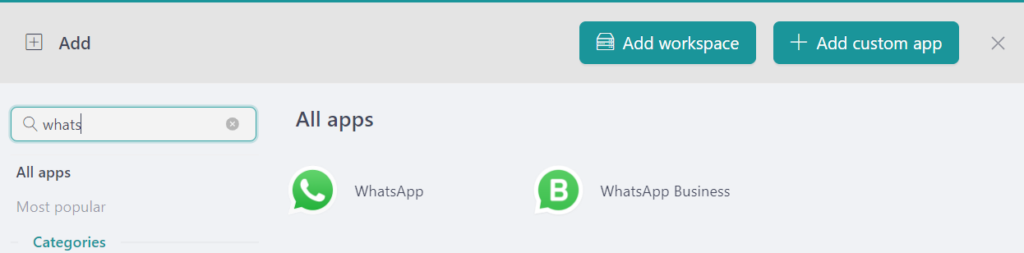
- Configure the app settings according to your workflow. You can also assign a Profile to keep different accounts and sessions separated.
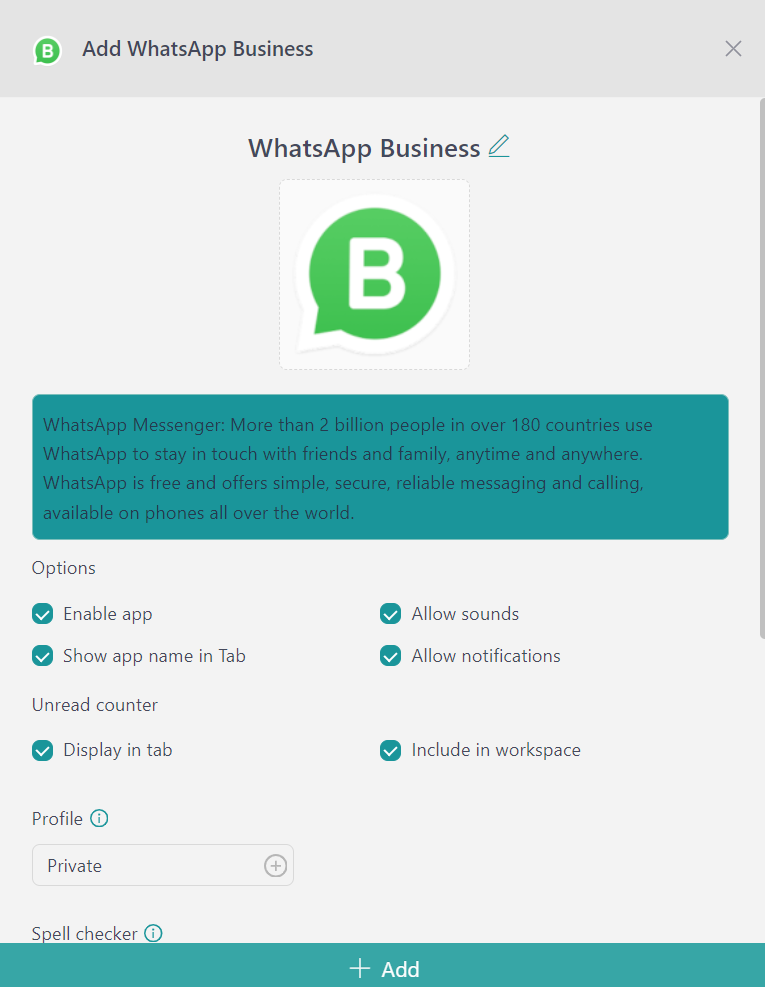
- Click “Add”, and the app will become part of your Rambox Workspace.
For messaging platforms where you manage several accounts, Rambox Profiles can help keep each login in a separate session instead of spreading your accounts across different browser profiles or windows.
With your messaging and work apps organized in one place, it becomes much easier to move between conversations without turning your desktop into a collection of disconnected windows.