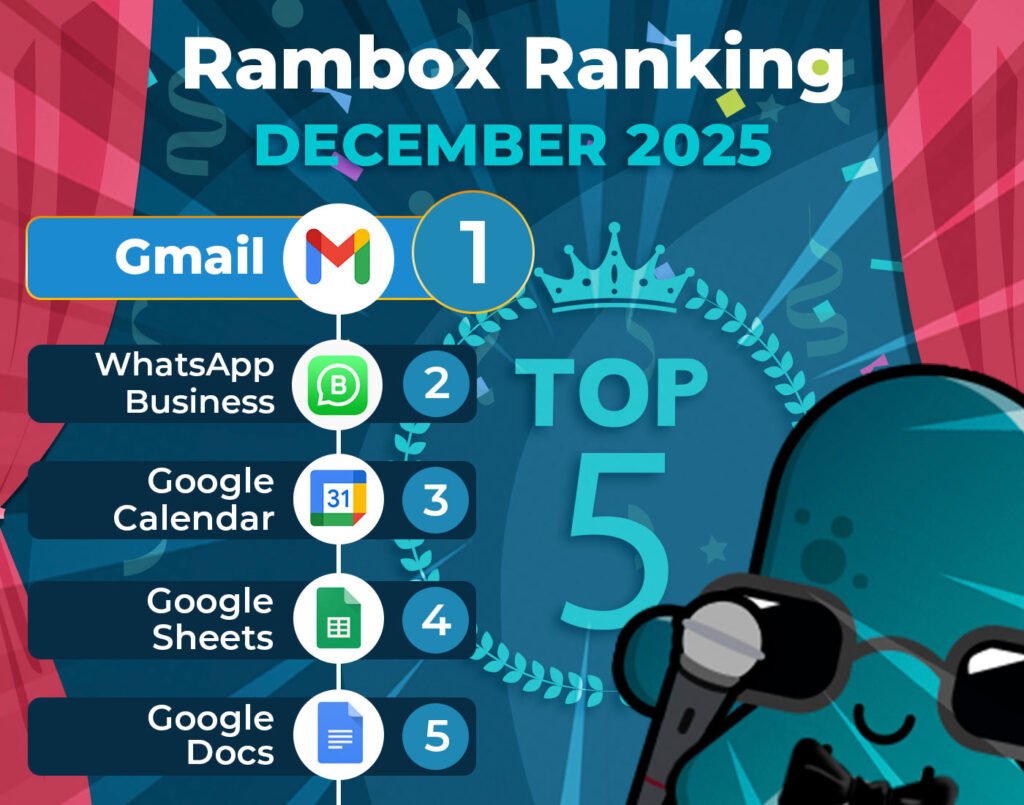
It’s time to unveil the power-packed lineup of December’s most-used apps on Rambox – your favorite workspace simplifier.
Join us on this exploration, where we first dive into the top 15 most-used apps. Here, we’ll unearth a mix of personal and professional digital applications that are the pillars of our users’ digital workspaces.
But our journey doesn’t end there. Let’s take a closer look at how the Rambox Ranking has evolved since last month, November.
Discover the latest trends and shifts in user preferences as we spotlight the newcomers who have made their mark in the top ranks and reveal our users’ new favorite apps.
Contents
Most-used apps on Rambox in December
First, we present the top 15 apps most used by Rambox users based on statistical and impersonal data.
These are the digital frontrunners that shaped our users’ workflows this month.
How has the Rambox Ranking changed in the last month?
December wraps up the year with a few interesting shifts, mostly in the middle of the ranking.
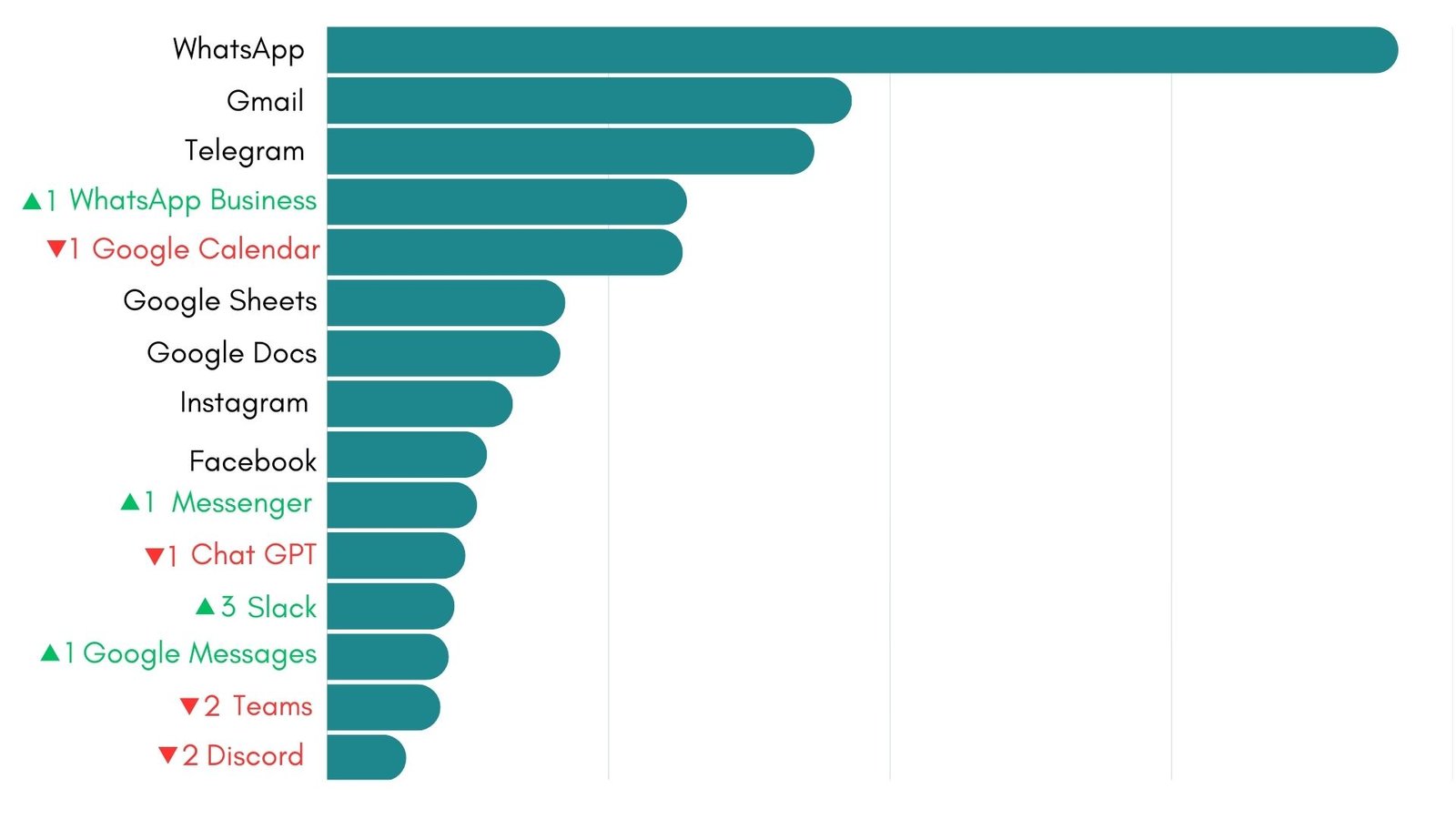
At the very top, everything stays exactly the same. WhatsApp, Gmail, and Telegram continue to lead the list in first, second, and third place. These three apps have been the foundation of daily work for Rambox users all year long, and December is no exception.
Right after that comes the most noticeable change of the month. WhatsApp Business moves up to fourth place, swapping positions with Google Calendar, which drops to fifth. As deadlines approach and projects are closing, fast business messaging becomes more valuable than ever, and many users rely on WhatsApp Business to keep conversations with clients and teams flowing smoothly.
From there, things stay fairly stable. Google Sheets and Google Docs hold their sixth and seventh spots, showing once again how central documents and spreadsheets are to everyday work. Instagram remains in eighth place, and Facebook continues at ninth, reminding us that social platforms are still part of many professionals’ daily routines.
Further down the ranking, December brings more movement. Messenger climbs to tenth place, while ChatGPT slips to eleventh. This suggests that as the year comes to a close, quick conversations start to matter more than longer, AI-assisted tasks.
The biggest surprise this month is Slack, which jumps three positions to land in twelfth place. Google Messages also keeps moving up, now in thirteenth place. Meanwhile, Teams and Discord both fall two spots, closing the list in fourteenth and fifteenth place.
All in all, December shows a clear focus on tools that help teams stay connected and coordinate quickly, while the most trusted productivity and communication apps continue to shape how people work inside Rambox.
2025 recap: the apps that defined how we worked
With 2025 now behind us, this is the right moment to step back and look at the bigger picture.
We will identify the main trends that shaped user behavior throughout the year, by looking at the apps that remained essential, the ones that grew in importance, and the way different tools naturally came together in everyday routines.
The “always on” trio: WhatsApp, Gmail, and Telegram
Throughout 2025, these three apps remained the most consistently used tools among Rambox users. Month after month, WhatsApp, Gmail, and Telegram held the top positions in the ranking, not because of short-term trends, but because they continue to meet the core communication needs of modern digital workspaces.
Together, they cover a wide range of everyday communication. Gmail supports formal conversations and long-form exchanges. WhatsApp enables fast, direct messaging between teams and clients. Telegram provides a flexible space for group communication, channels, and information sharing that moves quickly and efficiently.
What this consistency shows is that communication continues to be the foundation of digital workflows.
Google Workspace stayed as the productivity backbone
Throughout 2025, Google Calendar, Google Sheets, and Google Docs stayed firmly present in the Rambox Ranking, month after month. This is not just about individual apps performing well, but about the appeal of the Google ecosystem as a whole.
What makes this ecosystem so attractive is how naturally its tools work together. Scheduling a meeting in Calendar, preparing the data in Sheets, and drafting the documentation in Docs happens within the same environment, with shared access, real-time collaboration, and automatic syncing across devices.
It is also worth mentioning the growing visibility of Gemini during 2025. As one of the most well-known AI tools on the market, Gemini has kept Google’s ecosystem very much in the spotlight. While we cannot measure its direct impact on app usage from the ranking alone, its presence may have helped reinforce interest in Google’s productivity tools throughout the year.
Business messaging became a default, not an exception
WhatsApp Business continued to strengthen its position as a regular tool for professional communication. Its presence in the ranking month after month shows that business messaging is no longer something used only by a few teams or specific industries, but a natural part of daily digital work.
This app supports fast conversations, quick updates, and direct contact with customers and partners, all from the same environment where many people already manage their personal messages. This makes it easier to handle work communication without jumping between different platforms or tools.
Over the course of the year, its consistent presence highlights a broader trend: professional communication is becoming more immediate and conversational, and messaging apps designed for business are now firmly established as core work tools.
Social apps remained part of the workday
Social platforms like Instagram, Facebook, and Messenger kept a stable presence in Rambox across the year, showing that they play a real role in modern professional routines.
For many teams and professionals, these apps support activities such as community management, customer communication, content sharing, campaign follow up, and fast exchanges with partners or clients. Having them available inside Rambox makes it easier to handle these conversations alongside email, documents, and collaboration tools, without losing focus.
This steady use highlights how communication, content, and interaction now live side by side inside the same digital workspace.
Collaboration tools reflected how teams operate
When looking at the full year, one thing stands out: collaboration tools did not settle around a single favorite. Teams, Slack, and Discord kept rotating in the ranking, showing that the way teams collaborate changes depending on the moment and the type of work.
At some points of the year, more structured tools like Teams gained visibility. At other moments, platforms like Slack and Discord became more active. And in December, Slack closed the year with its strongest movement, jumping three positions.
What this tells us is simple. There is no single “best” collaboration app for everyone. Teams move between different tools based on what they need at that time: meetings, internal coordination, project discussions, or community style conversations.
AI became part of the everyday toolbox
If there is one technology that clearly shaped how people worked in 2025, it was artificial intelligence. And inside Rambox, ChatGPT became the reference point for that shift, standing out as the most used AI app throughout the year.
Its steady climb and strong performance in the second half of 2025 show that AI is no longer something people open only for special tasks. Instead, it became a regular companion for writing, summarizing, generating ideas, and solving problems as part of normal work routines.
Even though ChatGPT dropped one position in December, its continued presence in the ranking confirms that AI is no longer on the sidelines. In 2025, it secured a permanent seat inside the digital workspace.
Why use these apps in Rambox?
Rambox is the ideal tool for managing communication and collaboration apps, keeping you informed about messages and project updates without feeling overwhelmed.
With Rambox you have full control over notifications, allowing you to customize how and when you receive alerts. Whether you prefer audible notifications, no sound or turn them off completely, Rambox ensures you stay focused on important tasks while minimizing distractions.
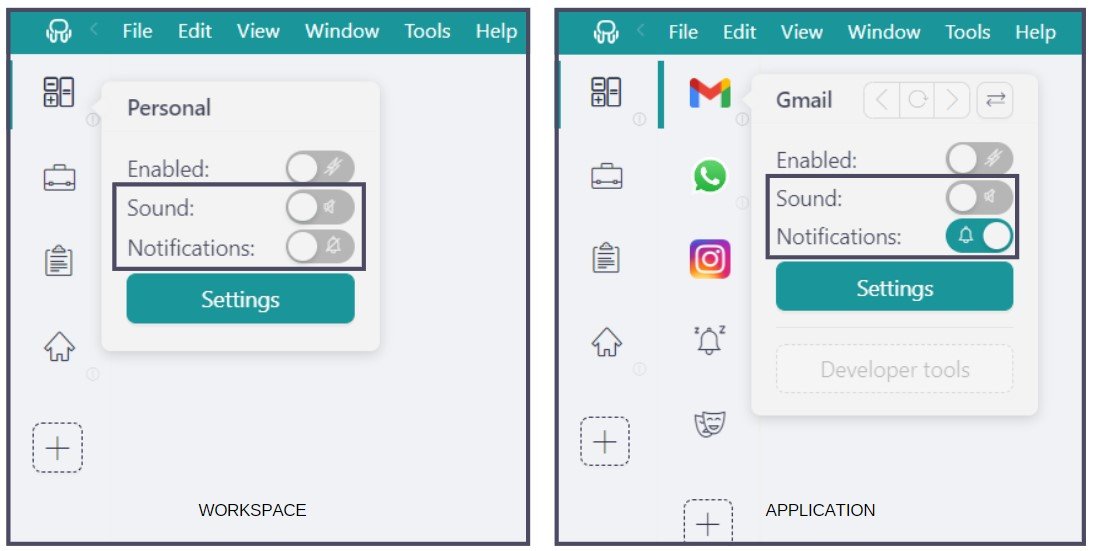
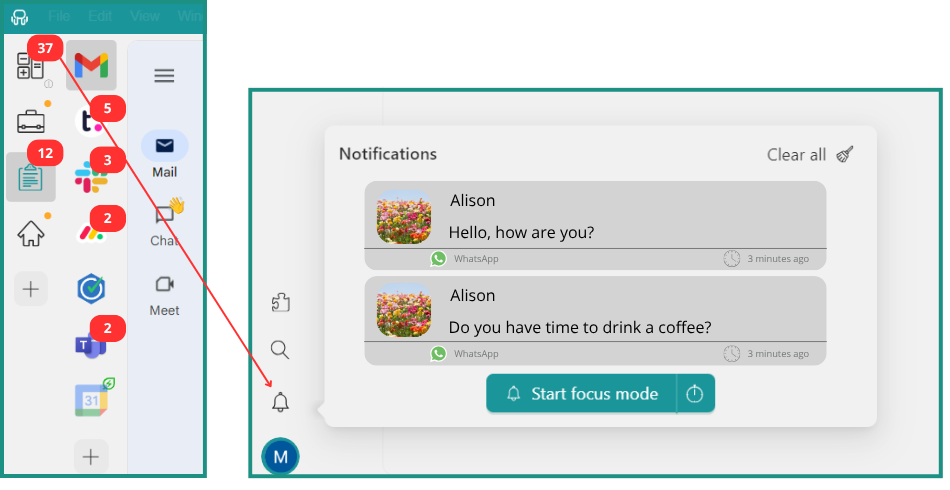
Plus, if you choose to turn off your notifications, the Notification Center serves as a centralized hub, ensuring that you never miss a critical message.
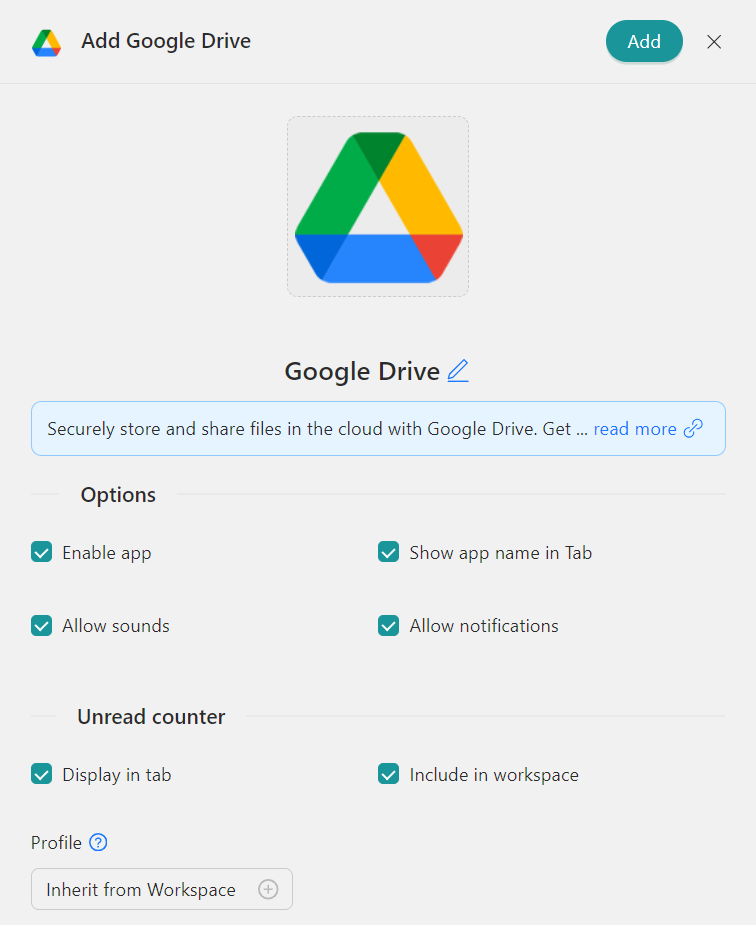
Each Profile in Rambox functions as a dedicated session, providing organized management for, as an example, multiple Drive accounts. Rambox offers several key profiles tailored to different needs: “Primary” for default settings, “Inherit from Workspace” for nested items, “Private” for isolated sessions, “Incognito” for enhanced privacy without storing cookies, and “Custom Profiles” for personalized configurations.
How to add these apps on Rambox?
Ready to bring these apps together? Setting them up in Rambox only takes a few seconds:
- Click on the “Add an app or workspace” button in your main tab or workspace.
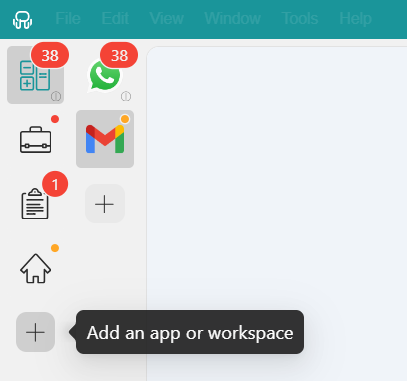
- Type the name of the app you want to add in the search panel at the left.
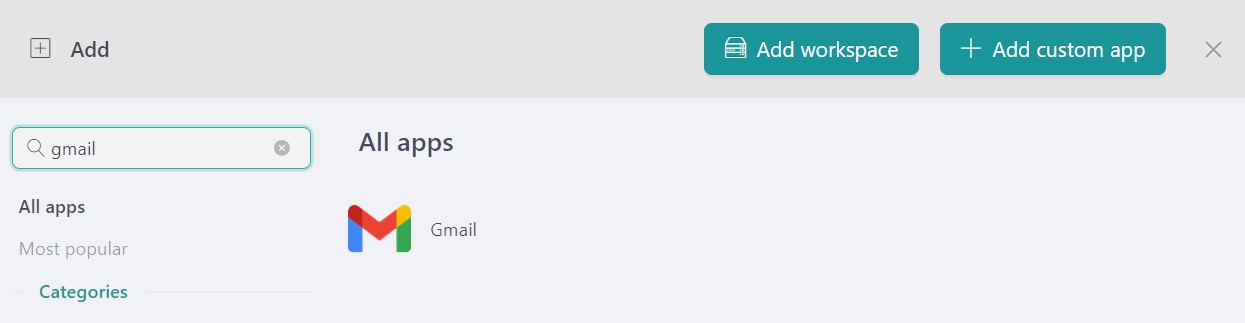
- Configure the application settings to your liking. Remember that you can choose which profile you want to use in the app (inherit from workspace, primary, private, incognito, or a custom profile).

- Click on “+Add,” and that’s it! The app has been added to your Rambox’s workspace!
December closes the year with a clear picture of how Rambox users shaped their digital routines throughout 2025. These trends now set the foundation for what comes next. So, as we step into 2026, which apps will define the way we work this time next year?
If you are overwhelmed by the number of apps you have to manage, try Rambox for free. All you have to do is download the program, configure it to your liking, and enjoy its functionalities. No cards, no cheating, it’s that simple!