Customer support rarely happens in just one place anymore.
A customer may send an email, another may reach out through WhatsApp, someone else may open a ticket, and another may contact your team through live chat or social media. Meanwhile, support agents may also need Slack or Microsoft Teams for internal communication, a CRM for customer information, a knowledge base, dashboards, and other internal tools.
Offering multiple customer service channels makes it easier for customers to contact you. But it can also make support harder to manage.
The challenge is not only responding through more channels. It is keeping all those channels, accounts, tools, and notifications organized without forcing agents to constantly jump between apps.
This guide looks at how to manage multichannel customer support efficiently, when an omnichannel platform makes sense, and when it may be more practical to keep your existing tools while centralizing the workspace where your team uses them.
What is multichannel customer support?
Multichannel customer support means providing customer service through more than one communication channel, such as email, live chat, phone, messaging apps, social media, or ticketing systems.
For example, a company might let customers contact its support team through Gmail, WhatsApp Business, a website chat, and Zendesk.
The channels do not necessarily have to share the same customer history or conversation context. That distinction becomes important when comparing multichannel and omnichannel customer service, which we will cover later.
For support teams, the practical challenge is simple: the more channels you offer, the more places there are to monitor.
What are the main customer service channels?
The right mix of customer service channels depends on your customers, your product, and the type of support you provide. Most teams combine several of the following.
As customer behavior evolves, support leaders also need to adapt their service channel strategy to new digital and AI-driven interactions.
Email remains one of the most common customer support channels, particularly for questions that do not require an immediate response or that need detailed explanations, files, or documentation.
The difficulty often appears when agents need to manage several inboxes—for example, different products, markets, brands, or clients.
Live chat
Live chat is useful when customers expect a quick response while browsing a website or using a product.
Because conversations happen in real time, agents need to notice new messages quickly without allowing every incoming notification to interrupt everything else they are doing.
Messaging apps
WhatsApp Business, Facebook Messenger, Telegram, and similar messaging apps have become customer communication channels for many businesses. For example, teams that manage more than one WhatsApp account may also need a practical way to keep those conversations and sessions separated.
Social media
Depending on the business, customers may ask questions or report problems through platforms such as Facebook, Instagram, X, or LinkedIn.
Support teams may therefore need to monitor social platforms alongside more traditional support tools.
Phone and video
Some issues are easier to resolve through a call, particularly when they are complex, urgent, or require step-by-step assistance.
Phone and video support may also coexist with email, ticketing, messaging, and internal communication tools during the same customer case.
Ticketing and self-service systems
Helpdesk platforms such as Zendesk, Freshdesk, Intercom, and similar tools help teams structure customer requests, assign cases, track status, and maintain customer histories.
They may become the core of a support operation, but they are rarely the only application an agent needs during the working day.
Why managing multiple support channels becomes difficult
Adding customer service channels is relatively easy. Managing them efficiently is harder. The problem usually comes from several types of fragmentation happening at the same time.
Too many apps and tabs
A support agent may start the day with Gmail, WhatsApp Business, Zendesk, Slack, Notion, a CRM, and several browser tabs open.
None of these tools is necessarily a problem on its own. The friction comes from having to move repeatedly between them throughout the day.
Opening another browser tab seems insignificant, but dozens or hundreds of small context changes can make a support workflow unnecessarily complicated. If this is already a problem for your team, these tips to manage multiple communication apps can help you reduce some of that friction.
Multiple accounts, brands, or clients
The problem becomes more difficult when a team manages more than one account in the same service.
For example:
- two Gmail support inboxes
- several WhatsApp accounts
- different Slack workspaces
- separate accounts for different brands or markets
- several client environments managed by an agency or outsourced support team
At that point, the challenge is not just which app an agent needs. It is also which account and context they should be working in.
Constant context switching
Answering a customer often requires information from somewhere else.
An agent may receive a message in WhatsApp, check an order in an internal dashboard, look up documentation in Notion, ask a colleague a question in Slack, and then return to the original conversation.
Every change of application adds friction and increases the chance of losing track of the original task.
Notification overload
More channels also mean more notifications. Email alerts, chat messages, support tickets, internal discussions, and messaging apps may all compete for attention at the same time.
If everything is treated as equally urgent, agents spend more time reacting to notifications and less time resolving customer problems.
Losing visibility across conversations and tools
When support work is distributed across many applications, it becomes easy to overlook a message simply because the relevant app is not visible.
This is different from losing a ticket inside a helpdesk. The issue is often more basic: the team has too many places to look.
How to manage customer support across multiple channels
There is no single setup that works for every support team, but a few principles make multichannel customer support considerably easier to manage.
1. Identify the channels your customers actually use
More channels are not automatically better. Before adding another support channel, look at where customers already contact your business and which channels make sense for the type of help they need. If most customers use email and WhatsApp, adding five more channels may create more operational complexity without meaningfully improving the customer experience.
The objective should be to offer the right channels, not the largest possible number of them.
2. Define what each channel is for
Customers should have a reasonable idea of what to expect from each channel, and your support team should know how each one fits into the workflow.
For example:
- Email: detailed or asynchronous requests
- Live chat: quick questions while a customer is active on your website
- WhatsApp: direct messaging and ongoing conversations
- Ticketing: structured cases that need tracking, assignment, or escalation
- Phone/video: urgent or complex issues
The exact division will vary, but defining it prevents every channel from becoming an unstructured version of every other channel.
3. Keep customer-facing and internal tools in the same workflow
Customer support does not happen only in customer-facing applications. An agent may also need:
- Slack or Microsoft Teams
- CRM software
- internal dashboards
- documentation
- a knowledge base
- project management tools
- billing or account systems
When planning a multichannel support workflow, think about the complete set of tools agents need to resolve a request, not only the channel where the request first arrives.
4. Separate accounts, brands, and customer contexts
If your team manages several brands, products, regions, or clients, define clear boundaries between them. Keeping different accounts separated reduces mistakes such as replying from the wrong inbox or mixing customer contexts.
This is particularly important for agencies, outsourced support teams, companies with several brands, and businesses operating multiple regional accounts.
5. Reduce unnecessary app switching
There is an important difference between having several tools and having a fragmented workflow.
Your team may genuinely need Gmail, WhatsApp, Zendesk, Slack, and an internal dashboard. Replacing them all is not necessarily desirable.
The more practical question is:
Can agents access those tools without continuously searching through browser tabs, windows, and separate applications?
Reducing unnecessary switching can make an existing support stack much easier to work with, even if the individual tools remain unchanged.
6. Control notifications and prioritize attention
Not every new message deserves an immediate interruption. Agents need a way to distinguish between:
- messages that require immediate action
- conversations that can wait
- internal notifications
- low-priority alerts
A good multichannel setup should make important activity visible without turning every application into a permanent source of distraction.
7. Measure what happens in each channel
Organizing the workspace does not replace customer support analytics. Teams should still review metrics such as response times, resolution times, ticket volumes, customer satisfaction, and demand by channel.
Those insights help determine whether the current mix of channels is actually working, and whether some channels need more resources, different processes, or even removal.
Multichannel vs. omnichannel customer support: what’s the difference?
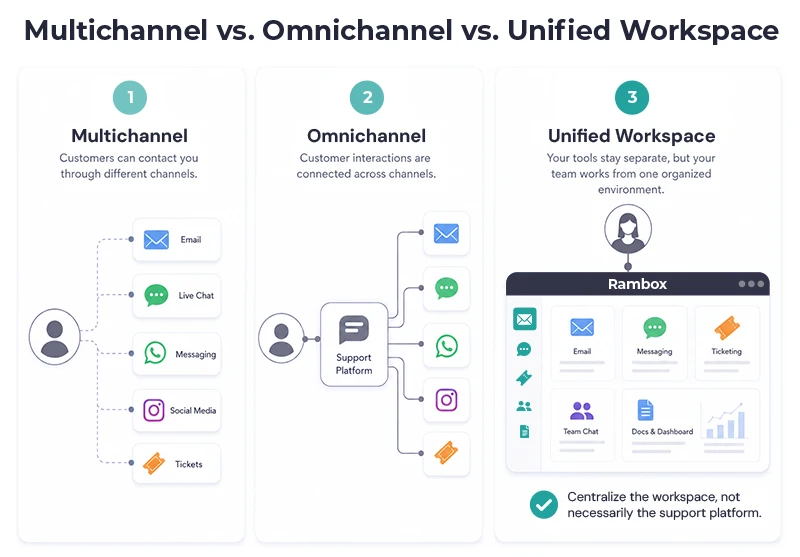
The terms multichannel and omnichannel customer support are often used interchangeably, but they describe different things.
- Multichannel customer support means customers can contact a company through several channels.
- Omnichannel customer support goes further by connecting those channels so that customer information, conversation history, and context can move between them.
For example, imagine a customer who starts a conversation through live chat and later sends an email.
- In a multichannel setup, both channels are available, but the email agent may need to find the earlier chat manually.
- In a fully integrated omnichannel setup, the agent may already see the previous conversation and customer context inside the same support platform.
That makes omnichannel systems useful when continuity between customer interactions is a major requirement, but it also leads to an important distinction:
A support team can be multichannel without having a fully integrated omnichannel platform.
And not every business necessarily needs to replace its existing tools to improve the way those channels are managed.
Do you need an omnichannel platform to manage multiple support channels?
Not necessarily.
An omnichannel customer service platform can be extremely useful when your business needs conversations, customer history, routing, ticket management, and reporting integrated across channels.
But that is not the only problem support teams face: sometimes a company already has the right tools. Its main problem is that agents have to work across too many of them.
There are therefore two different ways to think about centralization.
Option 1: Centralize customer conversations
An omnichannel helpdesk or customer service platform attempts to bring customer interactions into one system.
This approach is particularly useful when you need:
- a unified customer history
- routing and assignment
- centralized ticket management
- conversation continuity across channels
- cross-channel reporting
If those capabilities are central to your support operation, a dedicated omnichannel platform may be the right solution.
Option 2: Centralize the support workspace
Another approach is to keep the applications your team already uses while bringing them into a more organized working environment.
For example, your support stack might already include:
- Zendesk for tickets
- Gmail for email
- WhatsApp Business for messaging
- Slack for internal escalation
- Notion for documentation
- an internal account dashboard
Those tools serve different purposes, so replacing them with a single application may not make sense.
Instead, you can reduce fragmentation by centralizing where agents work with them.
An omnichannel platform centralizes customer interactions. A unified workspace centralizes access to the tools your support team uses.
The two approaches are not mutually exclusive. A company can use Zendesk or another helpdesk as the core customer support platform and still use a workspace tool to organize Zendesk alongside the rest of its daily applications.
This is where Rambox fits.
How Rambox helps teams manage multiple customer support tools
Rambox for Support & Operations is not a helpdesk and does not replace tools such as Zendesk, Freshdesk, Intercom, Gmail, or WhatsApp.
Instead, Rambox gives support teams one workspace where they can organize and use the applications and accounts they already rely on.
That can be particularly useful when customer support extends beyond a single ticketing platform.
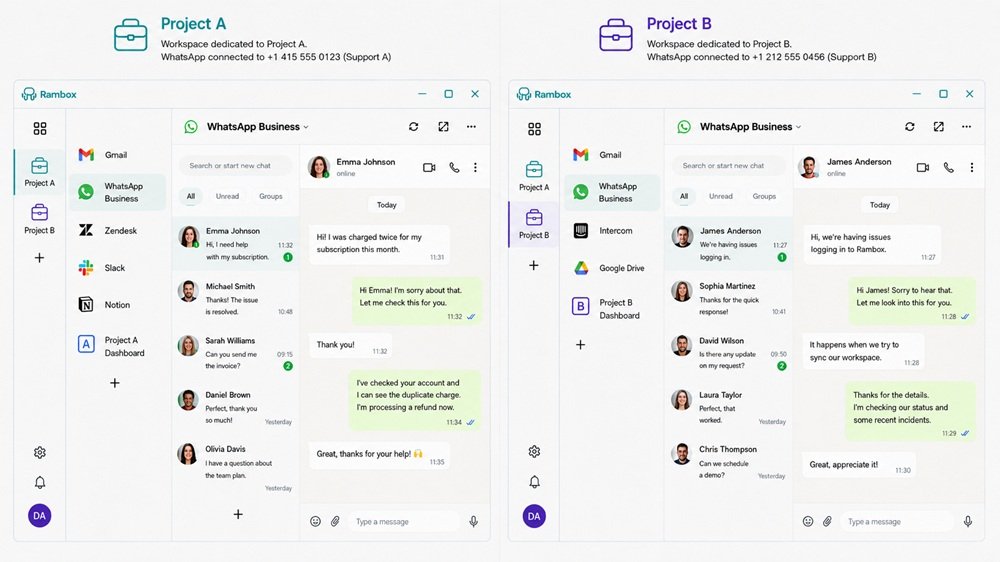
Keep support channels in dedicated Workspaces
With Rambox Workspaces, teams can group the applications related to a particular activity or context.
For example, a Customer Support workspace might contain:
- Gmail
- WhatsApp Business
- Zendesk
- Slack
- Notion
- an internal dashboard
Instead of keeping these services scattered across browser windows, they remain available inside the same working environment.
Manage multiple accounts with Profiles
Support teams often have to manage more than one account for the same application.
Rambox Profiles and multiple-account features can help keep different identities and sessions separate. That can be useful for teams managing:
- several brands
- regional accounts
- multiple clients
- separate customer support inboxes
- different WhatsApp or communication accounts
Instead of repeatedly logging in and out, or relying on multiple browsers, each context can remain separated.
For example, each project can have its own workspace and its own logged-in account for the same app, such as WhatsApp Business.
See important activity without checking every app
One of the biggest problems with multichannel support is visibility. Agents should not need to manually open every application simply to discover whether something needs attention.
By keeping support tools together and managing notifications from the same environment, Rambox can reduce the need to constantly check different apps and windows.
Monitor several tools side by side
Some support situations require information from more than one application at the same time.
With Tile View, agents can display several apps simultaneously. For example, a customer conversation alongside documentation or an internal dashboard.
That can reduce the back-and-forth involved in resolving requests that depend on information stored elsewhere.
Add the tools your company already uses
Support stacks are rarely identical. Alongside well-known apps, companies often depend on internal platforms or less common web tools.
Rambox can therefore be used not only with applications from its catalog but also with Custom Apps, allowing teams to build a workspace around their actual workflow rather than a predefined set of customer support software.
Rambox doesn’t replace your helpdesk, CRM, email client, or messaging channels. It gives your team one environment in which to work with them.
Example: a multichannel customer support workspace
Imagine a support agent who uses:
- Gmail for customer emails
- WhatsApp Business for direct messages
- Zendesk for support tickets
- Slack for internal escalations
- Notion for documentation
- an internal dashboard for customer or account information
Here’s how those tools could be organized inside a dedicated Rambox support workspace:
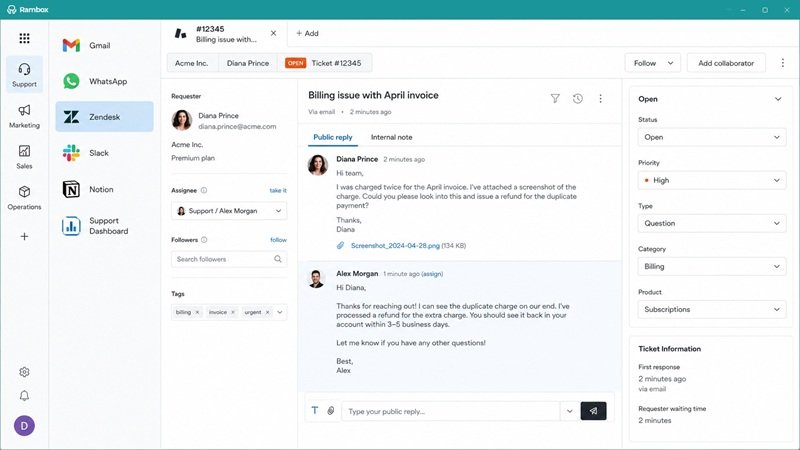
In this kind of setup, a typical situation might start with a customer sending a message through WhatsApp about a billing issue.
The agent can then open the related ticket in Zendesk, check the customer account in the internal dashboard, consult the relevant process in Notion, ask the billing team a question in Slack, and return to the customer conversation once the issue is resolved.
None of those tools is redundant; each one performs a different job. The inefficiency comes from having the workflow fragmented across different browser tabs, windows, sessions, and applications.
In Rambox, the agent can keep all six tools inside a dedicated support workspace. If the team manages several brands or accounts, Profiles can keep those contexts separated as well. The result is not an omnichannel customer history. The result is a more organized environment for the agent performing the support work.
That distinction matters:
- If your problem is fragmented customer data, you may need an omnichannel customer support platform.
- If your problem is fragmented work, organizing the tools you already have may be enough.
Build a support workflow around the tools you already use
Multichannel customer support does not have to mean replacing your entire customer service stack.
Start by understanding which channels your customers actually need. Define the role of each one. Make sure agents can access the internal tools required to resolve requests. Separate accounts and contexts clearly, control notifications, and minimize unnecessary application switching.
Then decide what kind of centralization your team actually needs:
- If you need connected customer histories, routing, and unified ticket management, an omnichannel customer service platform may be the right choice.
- If you already have the right tools but they are difficult to manage together, centralizing the workspace can solve a different—and equally practical—problem.
Rambox helps support and operations teams bring their communication apps, support platforms, internal tools, and multiple accounts into one organized environment.
Discover Rambox for Support & Operations
Frequently asked questions
What is multichannel customer support?
Multichannel customer support means allowing customers to contact a business through several communication channels, such as email, live chat, messaging apps, social media, phone, or ticketing systems.
What are the most common customer service channels?
Common customer service channels include email, live chat, phone, messaging apps such as WhatsApp, social media, ticketing systems, and self-service resources. Most businesses use a combination of channels rather than relying on only one.
What is the difference between multichannel and omnichannel customer support?
Multichannel support provides several ways for customers to contact a business. Omnichannel support connects those channels so customer history and context can be shared between interactions.
How can I manage multiple customer support tools in one place?
There are two main approaches. You can use an omnichannel platform to integrate customer interactions, or use a workspace manager to organize the separate support and communication tools your team already uses. Rambox follows the second approach, allowing multiple applications and accounts to be managed from one working environment.
Can Rambox replace customer support software?
No. Rambox is not a helpdesk or customer service platform. It complements tools such as Zendesk, Freshdesk, Intercom, Gmail, WhatsApp, Slack, and internal applications by helping teams organize and use them from one workspace.