Running a marketing campaign usually means working across multiple tools. In practice, you need to keep an eye on multiple platforms at once: analytics, SEO, social media, ads, and often conversations happening in parallel. Over time, this typically evolves into dozens of tabs, scattered data, and a constant sense of losing track of what truly matters.
In my experience, the problem is not a lack of tools or data. It’s how fragmented everything becomes during execution. You might have the right metrics, but not in the right place or at the right time. That’s where campaign monitoring stops being about “tracking performance” and starts becoming a question of how you organize your workspace to stay in control of your campaign in real time.
What is marketing campaign monitoring?
Marketing campaign monitoring is the process of tracking how a campaign is performing across different channels and tools while it’s running. It’s not just about reviewing results at the end, but about understanding what’s happening in real time and adjusting accordingly.
In most teams, this involves combining data from multiple sources and trying to make sense of it quickly enough to take action.
What do you need to monitor during a marketing campaign?
While every campaign is different, some elements tend to be consistently important. In my experience, teams usually keep an eye on a mix of:
- Traffic and behavior data (e.g. visits, bounce rate, time on page)
- Conversion-related metrics (leads, sign-ups, purchases)
- Channel performance (ads, organic search, social media)
- Engagement and interactions (comments, messages, replies)
These are just some of the most common areas. The exact setup depends on the campaign, but the key point is that the information is almost always spread across different tools.
What metrics matter most in campaign monitoring?
There’s no universal list of “the” metrics, but some tend to be more relevant depending on your goals. For example:
- For acquisition campaigns: traffic, cost per click, conversions
- For SEO-focused efforts: impressions, clicks, rankings
- For social campaigns: engagement, reach, interactions
The most important thing is not trying to monitor everything, but focusing on a small set of metrics that actually drive decisions. The challenge is not collecting data, but keeping it visible and usable while the campaign is active.
On paper, monitoring a campaign sounds straightforward. In reality, it quickly becomes messy once multiple tools and channels are involved.
The main issue is not complexity itself, but the small frictions that accumulate throughout the day.
Too many tabs and disconnected tools
It’s common to have analytics in one tab, ads in another, social media in a third, and maybe a couple more for messaging or internal tools.
Individually, each tool works well. Together, they create a fragmented workflow that forces you to constantly switch context.
Metrics in one place, conversations in another
Another common situation is that performance data and interactions live in completely different environments.
You might see a spike in traffic in your analytics tool, but the actual reason (a comment, a mention, a discussion) is happening somewhere else. Connecting those dots is not always immediate.
Constant context switching
All of this leads to one of the biggest hidden costs: context switching. Every time you move from one tool to another, you lose a bit of focus. It may not seem like much, but over the course of a campaign, it adds up and slows down decision-making.
This is where many teams struggle the most, even if they have the right data.
Why traditional dashboards don’t fully solve it
When campaign monitoring becomes complex, most teams turn to dashboards. Tools like Data Studio (antes Looker Studio), Tableau or Power BI are commonly used to centralize data and create a more structured view of performance.
In many cases, this works well, especially for reporting and long-term analysis. You can connect different data sources, build custom visualizations and track KPIs in a consistent way.
However, in my experience, dashboards don’t always fit the reality of day-to-day campaign monitoring, particularly when campaigns are active and changing quickly.
The gap between reporting and execution
Dashboards are designed to organize data, but not necessarily to support how people work during a campaign.
They are excellent for:
- reviewing performance over time
- sharing results with stakeholders
- analyzing trends and patterns
But during execution, the needs are different. You’re not just reviewing data, you’re reacting to it. You need to move between channels, check interactions, and understand context in real time.
The effort required to build and maintain them
Another important factor is the effort involved. Setting up a useful dashboard usually means:
- connecting multiple data sources
- defining the right metrics and dimensions
- building and adjusting visualizations
This takes time and, in many cases, specific expertise.
For ongoing reporting, this investment makes sense. But for many teams, especially smaller ones, it’s not always practical to rely on dashboards as the main tool for monitoring campaigns in real time.
What dashboards usually leave out
Even when well built, dashboards tend to focus on structured data. That means they often miss part of the picture. They rarely include:
- real-time conversations and comments
- qualitative signals from users
- quick feedback from social or messaging channels
This creates a situation where:
- metrics are in one place
- interactions are in another
And you still need to jump between tools to understand what’s really going on.
Why teams still go back to tabs
Because of these limitations, many teams end up relying on a mix of dashboards and direct access to their tools. They might check a dashboard for an overview, but then:
- open analytics for deeper insights
- go to social platforms to read comments
- check other tools to validate what they’re seeing
In practice, this often leads back to the same situation: multiple tabs, constant switching, and fragmented attention.
From what I’ve seen, dashboards are not the problem. They’re just not enough on their own for real-time campaign monitoring.
A simpler way to monitor marketing campaigns
After working with different teams and setups, I’ve found that the biggest improvement doesn’t come from adding more tools, but from changing how you use the ones you already have.
Instead of trying to centralize everything through integrations and dashboards, a simpler approach is to focus on visibility and structure. In other words, making sure the right information is always in front of you when you need it.
This is especially useful during active campaigns, where speed and context matter more than perfect reporting.
Turning your tools into a visual workspace
One setup I often recommend is to treat your tools as part of a single workspace rather than isolated tabs.
Instead of jumping between platforms, you keep them open and arranged in a way that reflects how you actually work. For example, placing analytics, SEO and social tools side by side allows you to quickly compare signals and spot patterns.
This doesn’t require any new tools or complex configuration. It’s more about organizing your environment so it supports your workflow, not the other way around.
Seeing everything at once without integrations
One of the main advantages of this approach is that it removes the need for integrations.
You’re not trying to merge data into a single system. You’re simply keeping each tool in its native environment, but making them visible at the same time. This has two immediate effects:
- You reduce the time spent navigating between tools
- You improve your ability to react in real time
It may sound simple, but having multiple sources visible at once changes how quickly you can understand what’s happening and decide what to do next.
Is there an easier way to monitor campaigns?
In practice, yes. Not by replacing dashboards or analytics tools, but by reducing the friction in how you access them.
It’s not about building the perfect system, but about having a setup that is fast, flexible and easy to use when it matters most.
Example: a campaign monitoring setup
To make this more practical, it helps to look at a simple setup you can use during an active campaign. This is not a fixed model, but a starting point you can adapt depending on your channels and goals.
The setups that tend to work best are not the most complex ones, but the ones that let you see the right information at the right time without overthinking it.
This is exactly where Rambox fits. Instead of working across dozens of tabs, you can bring your tools into one place and turn them into a visual, structured workspace.
Here’s a simple example of how this can look in practice:
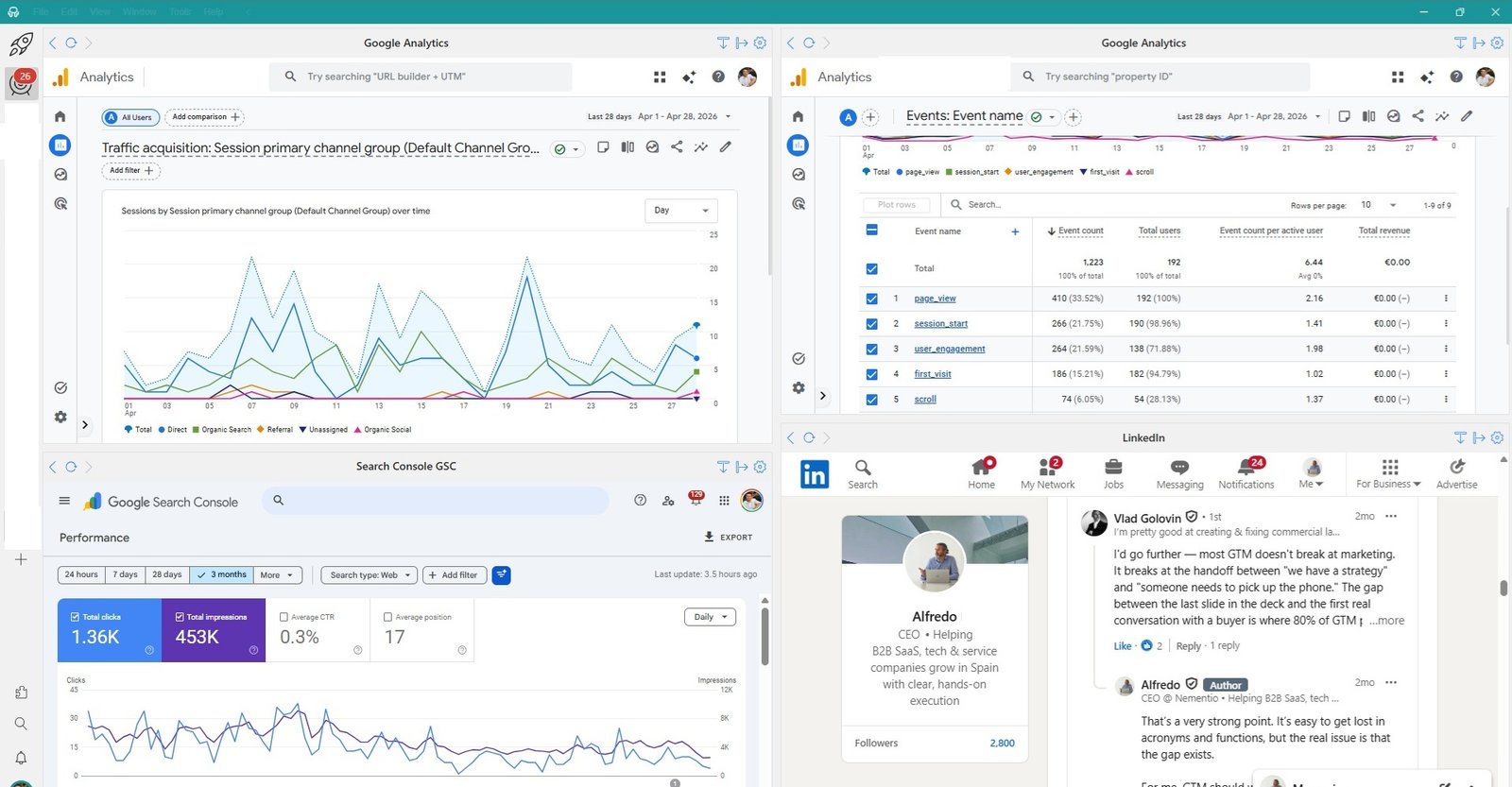
In this setup, I’m not trying to build a perfect dashboard. I’m simply keeping the key pieces visible:
- Traffic acquisition (top left) to understand where users are coming from
- Conversions and key events (top right) to see if the campaign is delivering results
- Search performance (bottom left) to track organic visibility and queries
- Campaign activity and interactions (bottom right) to stay close to what users are actually doing
You can explore all available apps in the Rambox app directory.
This gives a quick, actionable view of the campaign without needing to switch between tools. This setup takes less than five minutes to create in Rambox using Tile View.
The goal is not to cover everything, but to have a clear snapshot of how the campaign is evolving across channels.
Monitoring performance and interactions side by side
One of the most useful aspects of this kind of setup is being able to connect performance data with real activity.
Instead of only looking at metrics, you can immediately see what’s happening around them. For example, a spike in traffic or conversions makes much more sense when you can also see:
- comments on a post
- reactions or engagement
- ongoing conversations
With Rambox, all of this sits in the same workspace. Analytics on one side, interactions on the other, without switching tabs.
This is often where things click. You move from just tracking numbers to actually understanding what is driving them.
Benefits of a simpler monitoring setup
Once you move from switching tabs to working in a structured workspace, the impact is noticeable almost immediately. You’re not adding new tools or data sources. You’re simply changing how you access and use them.
In practice, this tends to make campaign monitoring feel less chaotic and much more actionable, especially when things are moving fast.
Faster decisions during campaigns
When your key metrics and channels are visible at the same time, it becomes much easier to spot patterns and react.
You don’t need to:
- open multiple tabs
- remember where each metric lives
- rebuild context every time you switch tools
Instead, you can quickly connect what you’re seeing and decide what to do next.
Less context switching
One of the biggest gains comes from reducing context switching.
Moving constantly between tools may seem harmless, but it breaks your focus and slows you down. Over the course of a campaign, this adds up more than most teams expect.
By keeping everything in one place, you reduce those interruptions and make it easier to stay focused on the task.
Better real-time awareness
Campaigns rarely behave in a linear way. Things change quickly, and timing matters.
Having multiple sources visible at once improves your ability to understand what’s happening in real time, not just after the fact.
This is especially useful when:
- a campaign is gaining traction
- performance suddenly changes
- you need to react quickly
Keeping everything in context
In my opinion, this is one of the most important benefits, and one that is often overlooked.
Seeing metrics, channels and interactions together helps you understand the full picture instead of isolated data points.
A spike in traffic, a drop in conversions or a change in engagement all make more sense when you can immediately see what’s happening around them.
This is what turns monitoring into something useful, rather than just a passive activity.
From monitoring to focus
At some point, campaign monitoring stops being about collecting data and becomes a question of how you work with it.
Most teams already have access to the right tools and metrics. The challenge is that, in day-to-day work, everything feels fragmented. You spend more time navigating between platforms than actually understanding what’s going on. This is where structure makes a difference.
Why structure improves decision-making
When your tools are organized in a way that reflects how you work, decisions become easier. You don’t need to:
search for information
- rebuild context every time you switch toolsre
- member where each metric lives
Instead, everything is already in front of you. This reduces friction and allows you to focus on what matters: interpreting the data and taking action.
In practice, this often leads to faster, more confident decisions, especially during active campaigns.
Reducing friction in daily campaign work
Small changes in how you organize your workspace can have a big impact over time. You’re not changing your stack or adding complexity. You’re simply removing unnecessary steps from your workflow.
This is one of the most overlooked aspects of campaign monitoring. Teams invest in tools, dashboards and data, but often ignore how that information is actually used during the day.
By reducing friction, you make monitoring feel less like a task and more like a natural part of how you work. And that’s ultimately the shift: from checking metrics occasionally to staying focused and in control throughout the campaign.
FAQs about marketing campaign monitoring
Here are a few common questions that often come up when teams try to improve how they monitor campaigns.
How do you monitor a marketing campaign in real time?
Keep a few key metrics and channels visible at all times. Focus on traffic, conversions and campaign activity, without trying to track everything.
What is the best way to track campaign performance?
Use a small set of relevant metrics and make them easy to access. Simplicity and visibility usually work better than complex setups.
Do you need a dashboard to monitor campaigns?
No. Dashboards help with reporting, but for daily work, a simple and well-organized workspace is often more effective.
What should you monitor during a marketing campaign?
Some of the most important elements include traffic, conversions, channel performance and user interactions. The exact mix depends on your goals.
How many tools should you use to monitor a campaign?
There’s no fixed number, but keeping it limited helps. The key is not adding more tools, but organizing the ones you already use.
Start organizing your campaign monitoring setup
If you’re running campaigns across multiple channels, the challenge is not access to data. It’s how you manage it during the day.
Rambox helps you bring your tools into one place and turn them into a structured workspace, so you can monitor performance, follow interactions and stay focused without switching tabs.
Instead of building complex dashboards, you can start with a simple setup and improve it over time based on how you actually work.
Start your free trial and see how Rambox helps you monitor campaigns without switching tabs