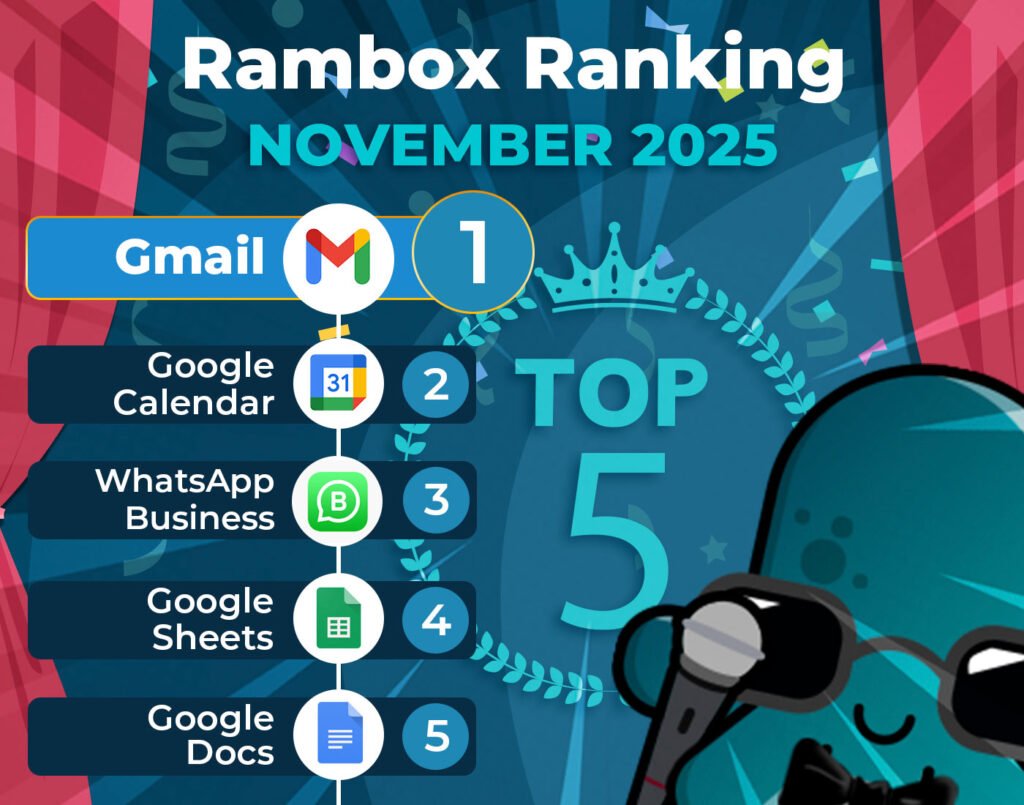
It’s time to unveil the power-packed lineup of November’s most-used apps on Rambox – your favorite workspace simplifier.
Join us on this exploration, where we first dive into the top 15 most-used apps. Here, we’ll unearth a mix of personal and professional digital applications that are the pillars of our users’ digital workspaces.
But our journey doesn’t end there. Let’s take a closer look at how the Rambox Ranking has evolved since last month, October.
Discover the latest trends and shifts in user preferences as we spotlight the newcomers who have made their mark in the top ranks and reveal our users’ new favorite apps.
Most-used apps on Rambox in November
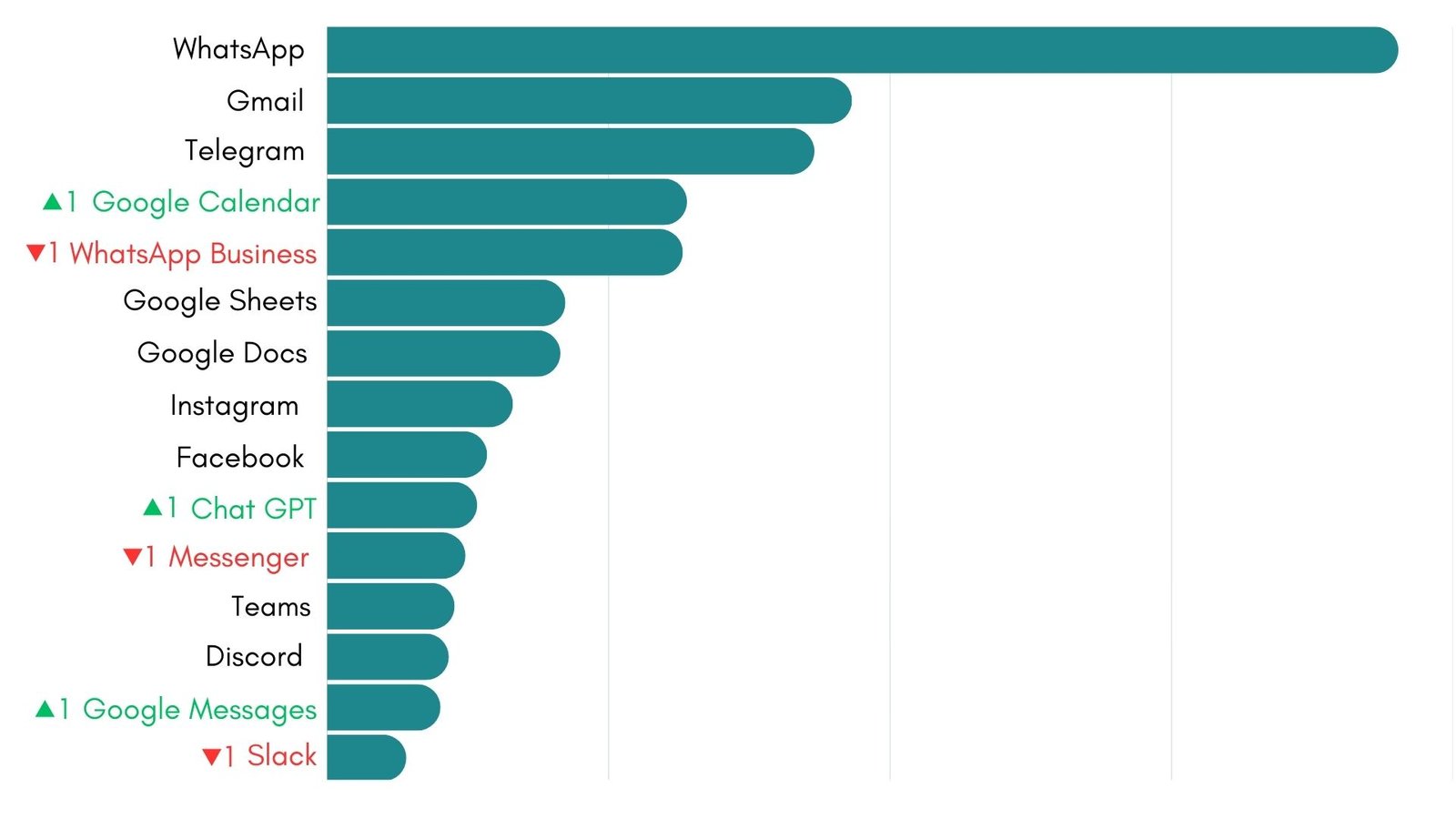
First, we present the top 15 apps most used by Rambox users based on statistical and impersonal data.
These are the digital frontrunners that shaped our users’ workflows this month.
How has the Rambox Ranking changed in the last month?
October left us with a fairly calm Ranking, but November has shaken the app list again. For the first time in months the top 5 has changed, with Google Calendar moving ahead of WhatsApp Business and taking the 4 spot.
At the very top nothing moves. WhatsApp remains at 1, Gmail holds position 2 and Telegram keeps its place at 3. After the swap in the top 5 the Ranking settles again with Google Sheets sitting at 6 and Google Docs right behind in 7. Instagram stays loyal to its 8 spot.
In the lower half there are more small movements. Facebook keeps 9, while ChatGPT steps up into position 10. That shift pushes Messenger down to 11. Next we find Teams holding 12 and Discord placed at 13. The last change comes with Google Messages moving up to 14 and Slack closing the Ranking in position 15.
The upper part of the leaderboard stays very stable, but the lower section keeps shifting. The rise of Calendar, ChatGPT and Google Messages shows how planning, quick AI assisted tasks and light messaging are gaining more weight in the daily routine of Rambox users.
Apps on the rise: Why Calendar, ChatGPT and Messages caught more attention
Some apps moved up this month, and it is not just a coincidence. Each one rose for a specific reason related to how people worked, planned or communicated. So why did these three climb the Ranking? Let’s take a closer look and try to understand what changed and why users opened them more often.
Google Calendar
Google Calendar has received an update that may be closely related to its climb in the Ranking. As we mentioned in our App Watch section in October, the new “Help me schedule” feature was introduced last month, bringing a smarter way to handle meeting planning inside the Gmail compose window.
Google’s update allows Gemini to suggest ideal meeting times based on your availability and the context of the email you are writing. This option is meant for one on one meetings and appears directly under the message you are drafting. Once you click it, Gmail shows a list of open timeslots, lets you edit them if needed and then inserts them into the email. When the other person chooses one of the suggested slots, the calendar invite appears automatically for both participants.
This change arrived as part of a broader wave of Google Workspace updates that brought AI into more everyday tools. In the case of Calendar, the integration with Gmail makes scheduling smoother and more visible during the workday. That improvement could be one of the reasons why the app received a little more attention this month.
ChatGPT
It is no surprise to see ChatGPT climbing higher each month, it continues to be one of the most popular AI assistants in the world. The surge in AI adoption is visible everywhere, and ChatGPT remains the first choice for many users. Even with solid alternatives like Gemini and Microsoft’s Copilot gaining attention, ChatGPT keeps a larger and more active user base.
The rise of AI in everyday work is hard to ignore. People are using AI for more and more tasks, from quick explanations to short rewrites and fast decision support. These repeated interactions make ChatGPT part of the daily routine for many users, which naturally gives the app more visibility inside Rambox and helps explain its climb in the Ranking.
Google Messages
Google Messages rises this month, and this may be related to how the app mixes traditional SMS with improved RCS messaging and security alerts. Messages acts as a universal channel for everything from standard texts to richer conversations with read receipts, typing indicators and high quality media. It also works as a gateway for Google account security, delivering login notifications and alerts about unusual activity.
These functions make the app appear more often during the day, especially for users who receive verification codes, security prompts or service updates. Messages has also gained new AI assisted options, such as help with writing and reactions powered by Gemini, which could make it more attractive for quick interactions.
Apps that could break into the Ranking before the year ends
Some apps sit just outside the top fifteen, and a few of them are close enough to move up if their usage keeps growing. Their position is not guaranteed, but their behavior during the last weeks makes them interesting to watch.
Let’s take a look at the ones that could have a real chance of joining the Ranking before the year ends:
- Outlook: people usually check it more when inboxes get hectic toward the end of the year, so it naturally becomes more active during these weeks.
- TikTok: its growth comes from the huge attention it gets from younger users, and from the way more brands and marketing teams are joining the platform to share content, stay visible and build active communities.
- Notion: planning new ideas, setting goals or getting ready for the next few months often leads users to open Notion more often.
- Canva: presentations, reports and end of year projects make Canva a go to tool for quick designs and visuals.
- Trello: when teams start wrapping up tasks and updating their boards, Trello becomes a frequent stop during the day.
Why use these apps in Rambox?
Rambox is the ideal tool for managing communication and collaboration apps, keeping you informed about messages and project updates without feeling overwhelmed.
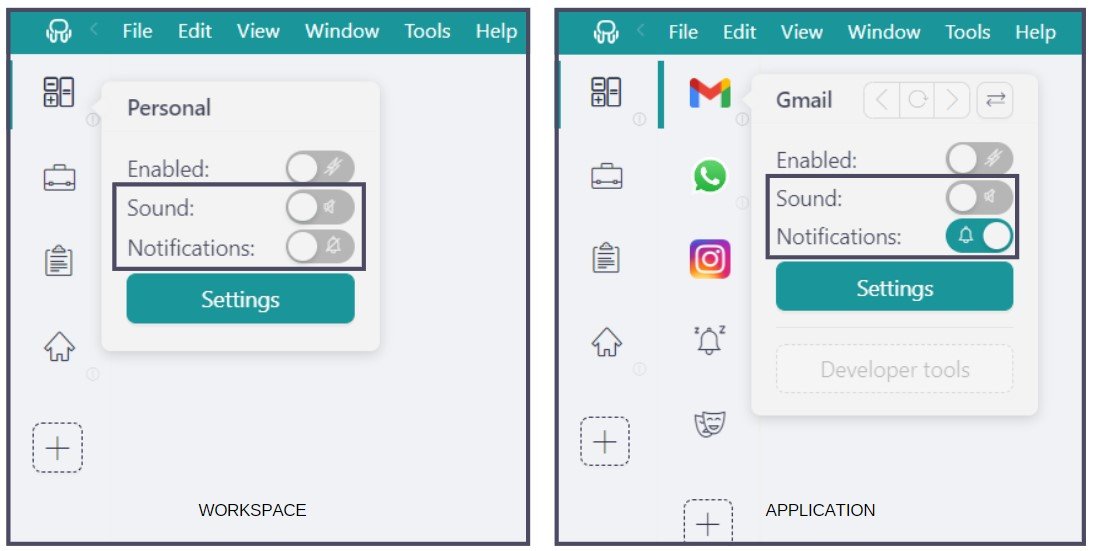
With Rambox you have full control over notifications, allowing you to customize how and when you receive alerts. Whether you prefer audible notifications, no sound or turn them off completely, Rambox ensures you stay focused on important tasks while minimizing distractions.
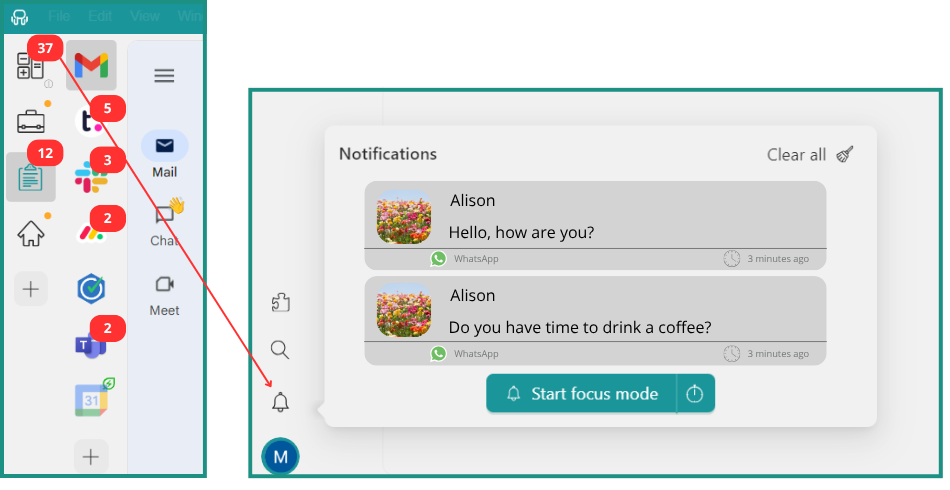
Plus, if you choose to turn off your notifications, the Notification Center serves as a centralized hub, ensuring that you never miss a critical message.
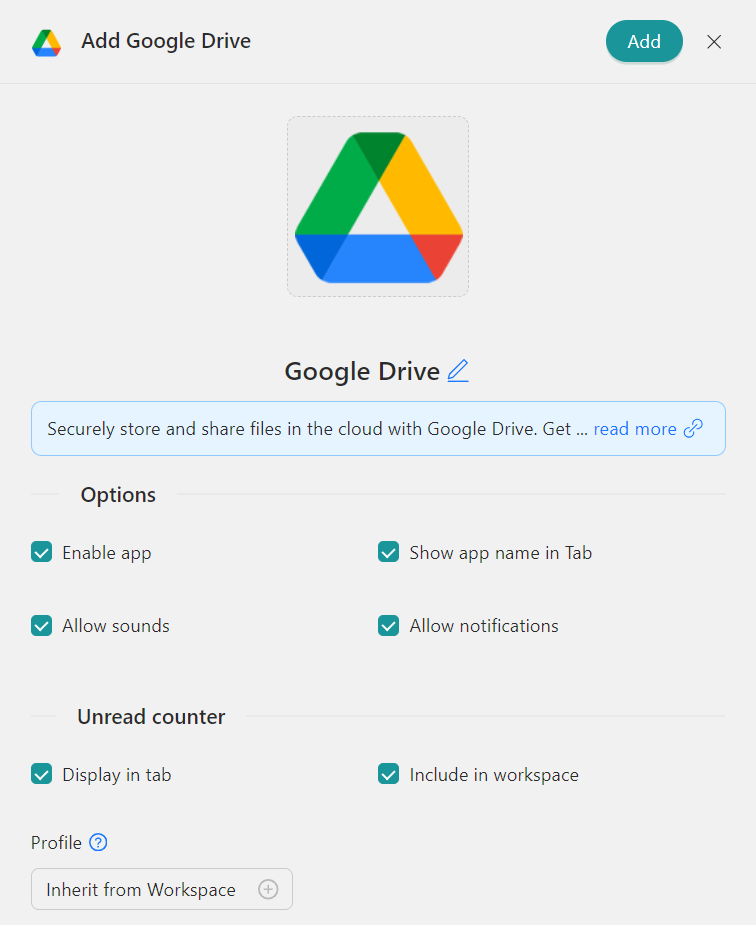
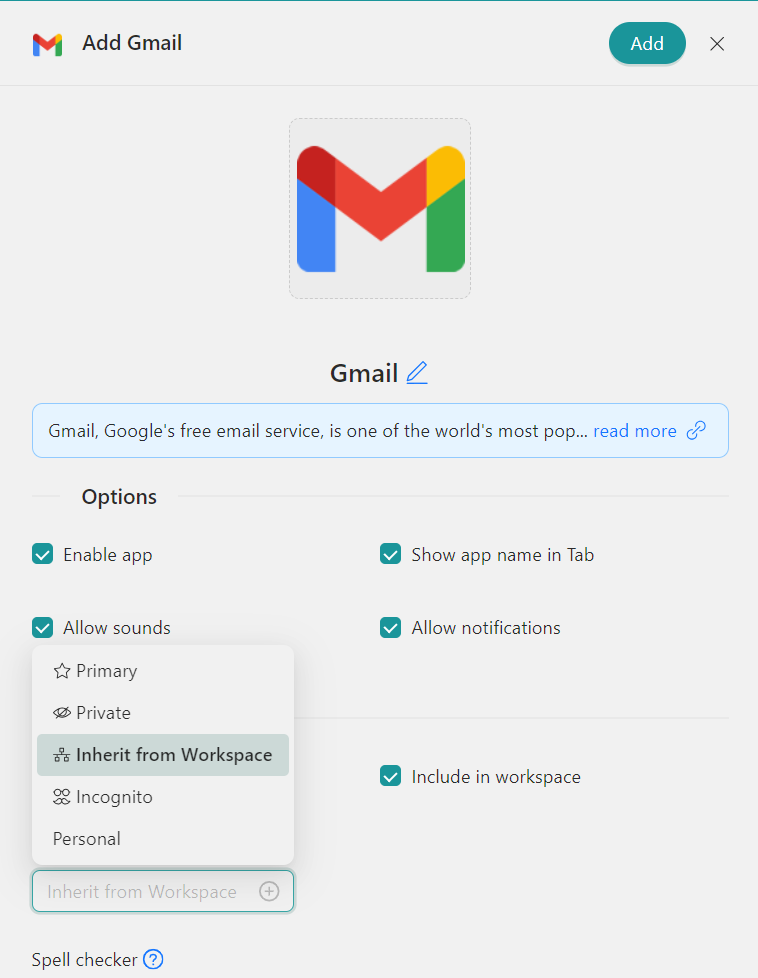
Each Profile in Rambox functions as a dedicated session, providing organized management for, as an example, multiple Drive accounts. Rambox offers several key profiles tailored to different needs: “Primary” for default settings, “Inherit from Workspace” for nested items, “Private” for isolated sessions, “Incognito” for enhanced privacy without storing cookies, and “Custom Profiles” for personalized configurations.
How to add these apps on Rambox?
Ready to bring these apps together? Setting them up in Rambox only takes a few seconds:
- Click on the “Add an app or workspace” button in your main tab or workspace.
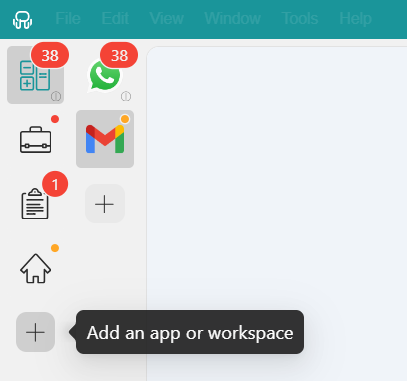
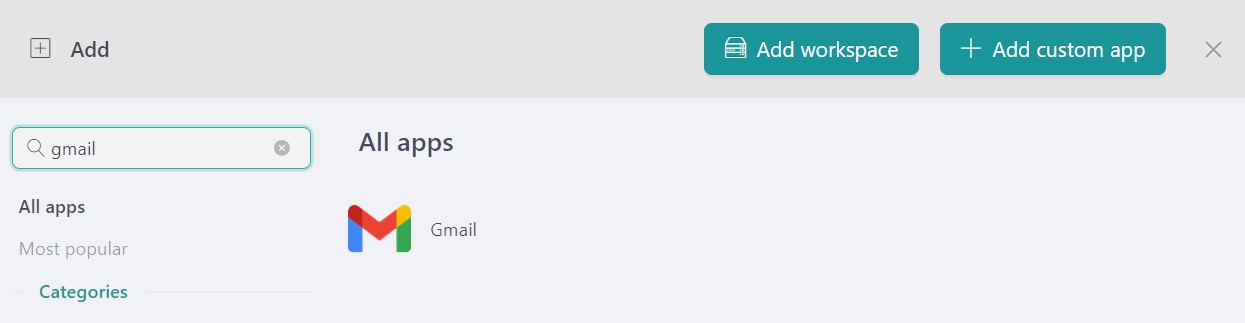
- Type the name of the app you want to add in the search panel at the left.
- Configure the application settings to your liking. Remember that you can choose which profile you want to use in the app (inherit from workspace, primary, private, incognito, or a custom profile).
November has brought new changes to the list and given us a clear view of how users are fine-tuning their digital routines. Let’s see if December shakes things up again.
If you are overwhelmed by the number of apps you have to manage, try Rambox for free. All you have to do is download the program, configure it to your liking, and enjoy its functionalities. No cards, no cheating, it’s that simple!